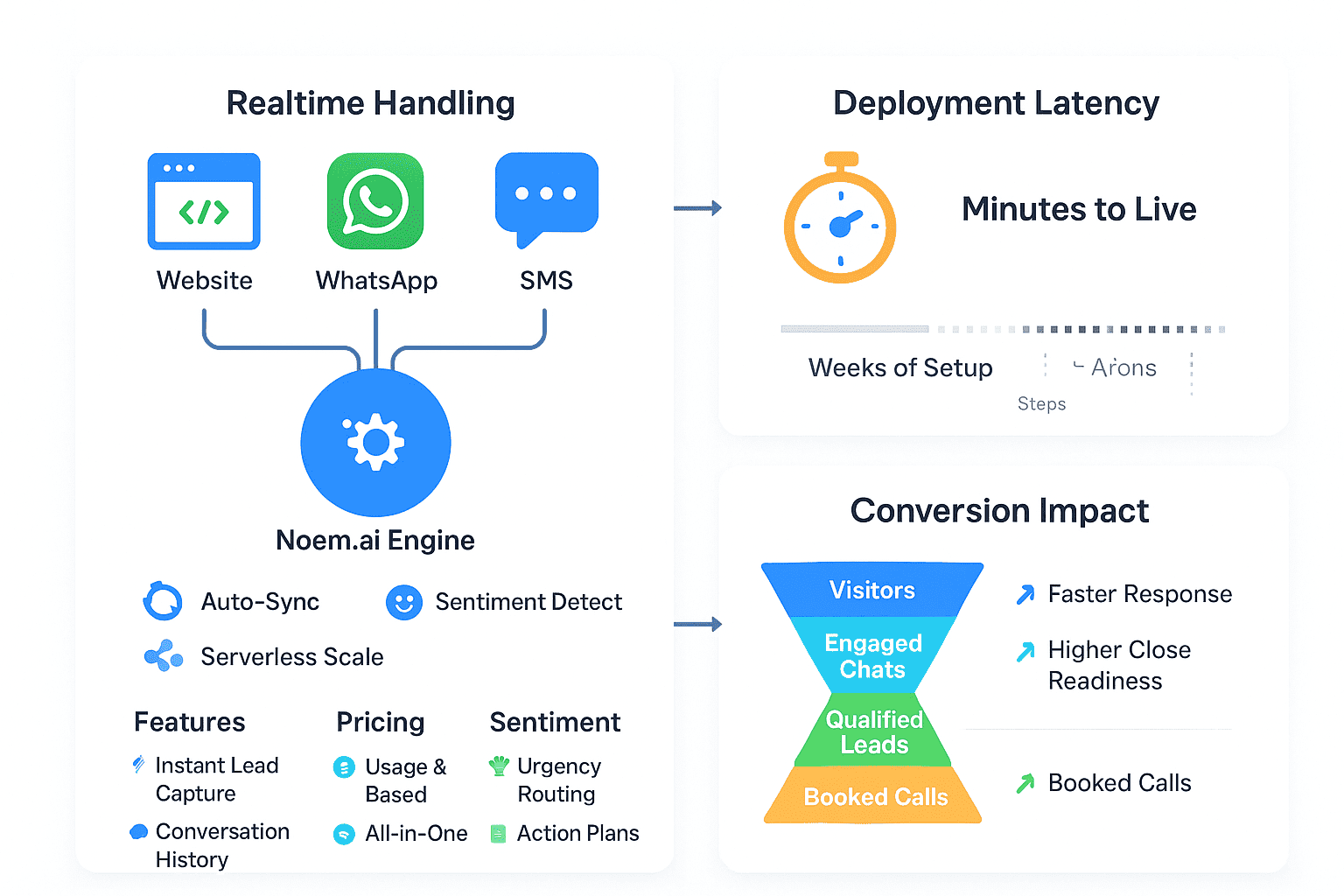
Rolling out an AI chatbot does not have to be slow, risky, or expensive. With Noem.ai, you can go live in days, not weeks, and start handling customer and prospect questions 24 hours a day on your website and channels. This means your team gets time back right away, while your customers get answers in seconds instead of hours. The platform is built as a single stack for builder, hosting, knowledge sync, multichannel publishing, and analytics, so you skip stitching tools together and just focus on outcomes. That speed and simplicity helps business owners move fast without a big learning curve or a heavy IT lift (ref: Noem.ai Blog).
- Instant response to customer and prospect questions: When you embed the chatbot on your site, it starts greeting visitors, answering FAQs, and capturing leads right away. Response time drops from hours or days to just a few seconds, which keeps people engaged and less likely to bounce. Faster answers make buyers more confident, and that lifts conversions on forms, demos, and sales calls. In side-by-side rollouts, simple site bots routinely bring reply times under 10 seconds when configured well (ref: Noem.ai Blog).
- Reduced workload for existing teams: Routine chats and common questions take up a lot of team time, and they come at all hours. When Noem.ai handles the repetitive ones, your team can focus on deals, escalations, and customer success instead of typing the same answers again and again. Many AI pilots show large deflection on day one and steady gains as you add more knowledge and refine prompts. Guides on fast AI implementation report sharp early wins when teams start with a focused use case and measure deflection week by week (ref: UseCarly)(ref: Stack AI).
- Consistent answers across sales and support: Sales and support teams sometimes give different answers to the same question, which confuses customers. With Noem.ai syncing to your approved docs and FAQs, the bot draws from one source of truth and sticks to your brand tone. This makes guidance more accurate and consistent across the whole funnel, from pre-sales to troubleshooting. Tools that add sentiment checks and controlled style guides make responses feel helpful and on-brand at scale (ref: Noem.ai Sentiment Analysis Guide).
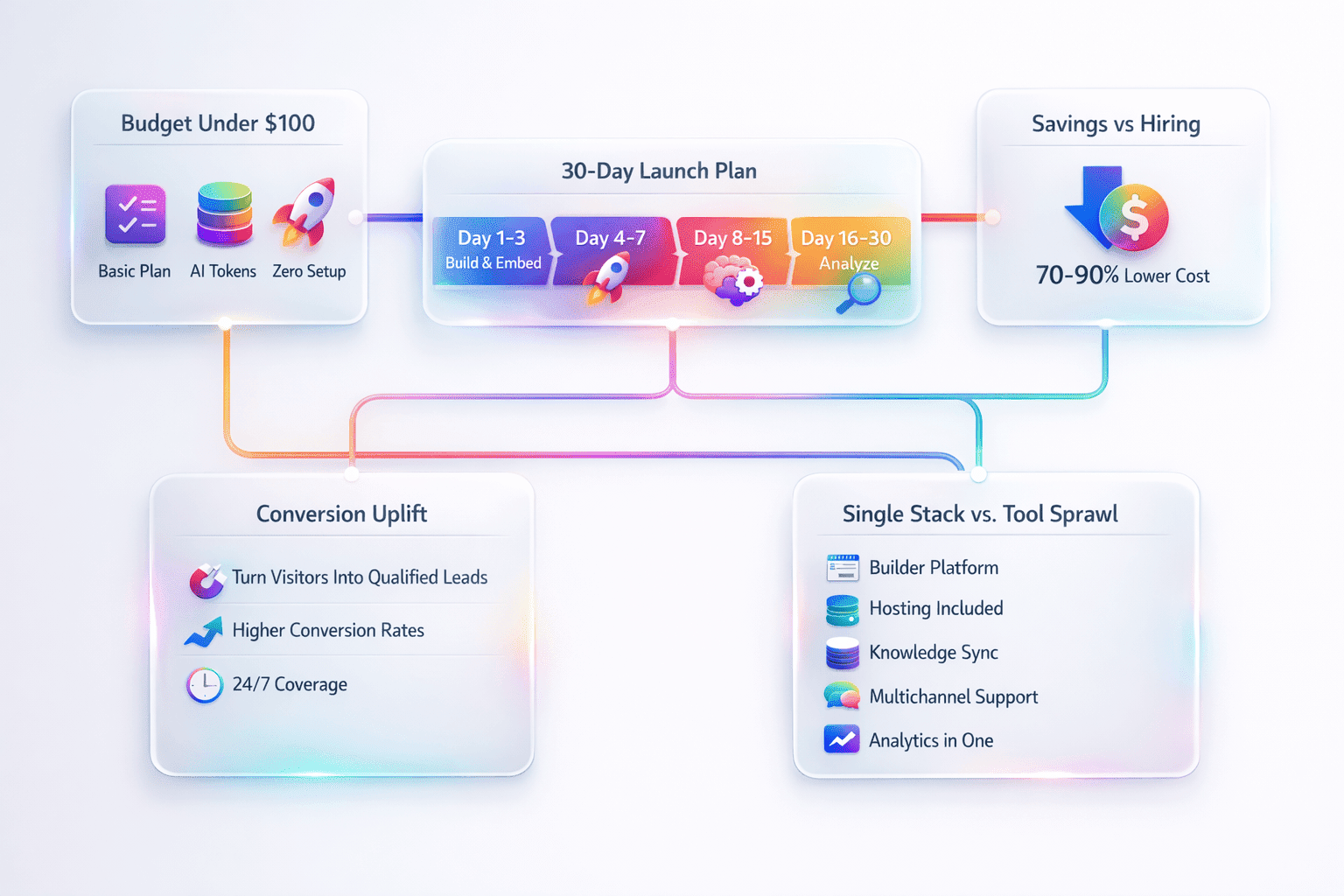
- Lower operating costs compared to hiring: For common question handling, AI chat can be far more affordable than adding headcount. Industry guides show that AI support tools often cost 70 to 90 percent less than staffing equivalent hours over time, especially when you factor nights and weekends. That gap grows as the bot handles more volume without overtime or training cycles. Thirty-day readiness frameworks show small businesses can test ROI quickly and make a smart budget call without a long contract or custom build (ref: ITxmen 30 Day Readiness)(ref: UseCarly).
- Reducing onboarding costs: When your knowledge base is auto-synced to Noem.ai, the bot reflects your latest policies and product changes without manual re-training. This reduces the time you spend creating one-off docs and walking new team members through repetitive Q and A. It also reduces private note-taking and the risk of outdated scripts in the wild. Centralizing information makes new team ramp-up faster and steadier for repetitive queries (ref: Noem.ai Blog)(ref: Noem.ai Sentiment Analysis Guide).
Noem.ai focuses 100 percent on chatbots in one stack that includes builder, hosting, knowledge sync, multichannel publishing, and analytics, so your team goes live in minutes instead of weeks. This continuous auto sync keeps the bot aligned with your latest content, and usage based pricing helps costs scale in a predictable way. That mix of speed, simplicity, and trust is why many business owners prefer a single vendor over piecemeal tools. If you want to try a fast start, the published Noem.ai setup guides are easy to follow and include best practices you can use today (ref: Noem.ai Blog)(ref: Noem.ai Agent Guide).
Also, chatbots broadly show strong early results when paired with a good plan. Many first month programs report 40 to 60 percent ticket deflection and 95 percent completion rates for simple automated interactions once the knowledge base is mapped and tested. Goals like faster first response and higher self service are realistic in weeks rather than months. The key is scoping a single problem first, measuring tight metrics, and iterating with the data you collect (ref: UseCarly)(ref: Stack AI).
To help you move fast, the rest of this post gives you a clear 30 day checklist, the exact metrics to track, and a practical review rhythm. You can copy it, paste it into your project doc, and get to work today. We will also point to the right Noem.ai resources so you can skip guesswork. By the end of day 30, you will know what the bot handles, how much time you saved, and where to optimize next (ref: AI Implementation Checklist).
The 30 Day Implementation Checklist You Can Start Today
This plan assumes you are a busy business owner who wants fast progress without heavy tech steps. You will focus on one or two high value workflows, then expand. Each week has simple tasks, targets, and a time estimate. Keep it light, measure results, and improve with data. When in doubt, start smaller and let the numbers guide your next moves (ref: Stack AI)(ref: ITxmen 30 Day Readiness).
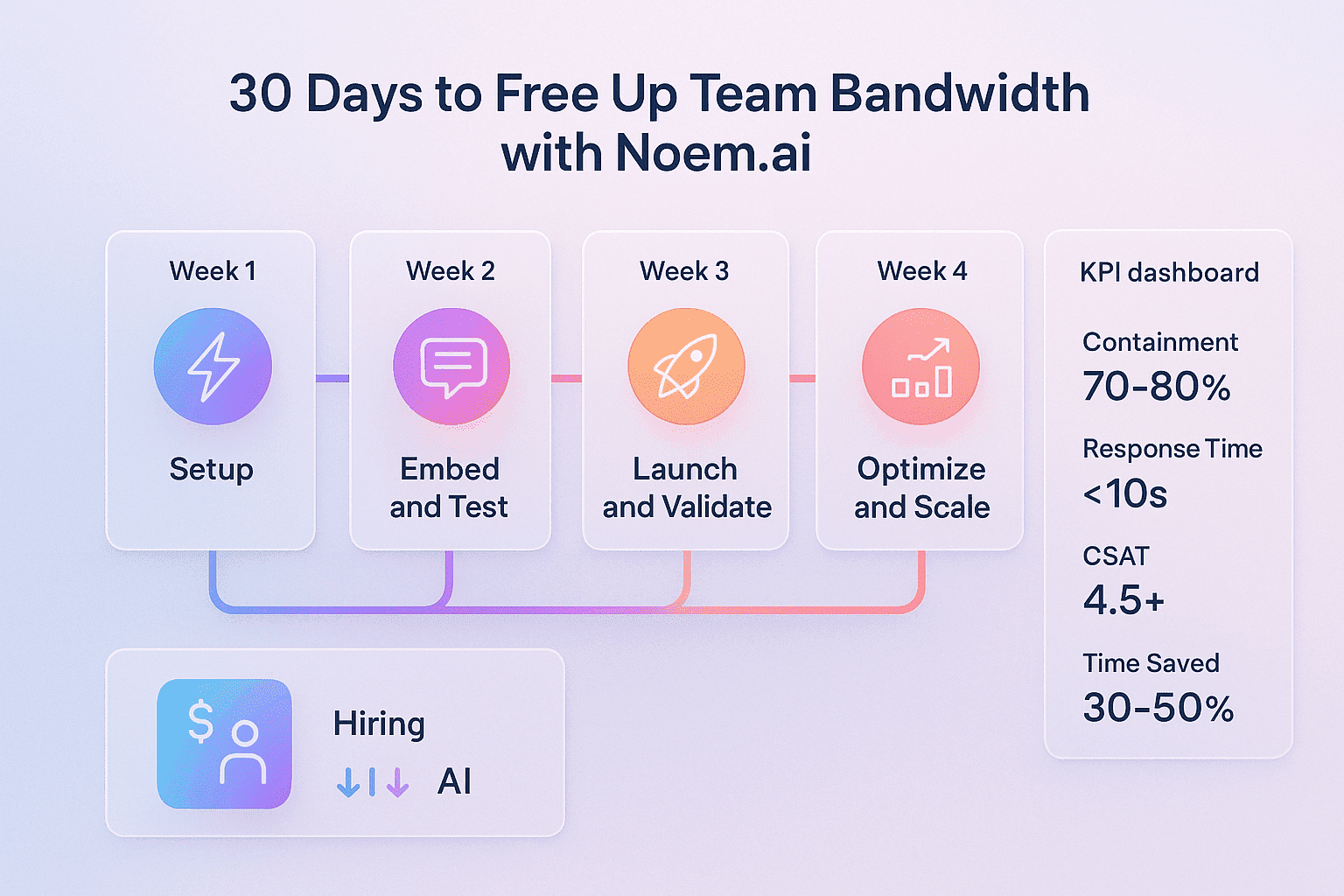
Week 1: Setup And Problem Discovery (Days 1 to 7)
- ☐ Document pain points: List the common questions that show up every day and the tasks that take more than 30 minutes a week. Add simple math so you can see the cost, like hours per week times hourly rate. This gives you a baseline and a clear reason to deploy the bot. Keep the scope tight so your first win is easy to ship and measure. A short, focused backlog sets you up for speed and confidence (ref: AI Implementation Checklist).
- ☐ Create your Noem.ai project: Open an account, add a friendly welcome, set brand tone notes, and list approved domains. Ask and test the top 10 questions you just listed to make sure the voice feels right and the answers are crisp. Keep language simple, helpful, and transparent so visitors trust the bot. This early shaping step improves quality and reduces rework later (ref: Noem.ai Blog).
- ☐ Connect your knowledge base: Sync your docs, FAQs, and product pages so the bot can reference the real source of truth. Turn on auto sync so updates to your site or docs get pulled in without manual copy and paste. Define a simple goal like handle 50 percent of routine questions by day 30. Use friendly, branded answers that link to your pages for extra trust and clarity (ref: Noem.ai Sentiment Analysis Guide).
- ☐ Define metrics for Week 1 to Week 4: Set clear targets for containment rate, first response time, and CSAT. Make them realistic so the team sees steady progress, not a miracle. Good goals are 60 to 80 percent containment, under 10 seconds to first response, and CSAT of 4.5 or better. Add a note about escalation rate under 20 percent so you know when humans need to step in with care (ref: UseCarly)(ref: Stack AI).
- Time estimate and focus: Expect 2 to 3 hours of setup and plan to put most of your effort here. A strong setup pays off fast because you reduce confusion later and you improve answer quality on day one. Lean guidance shows that front loaded clarity is the best way to earn early wins with AI rollouts. If something feels heavy, cut scope and keep moving so you can reach live traffic quickly (ref: AI Implementation Checklist).
Week 2: Embed And Test (Days 8 to 14)
- ☐ Embed the Noem.ai snippet: Paste the small code block before the closing body tag on your homepage and FAQ page. Pass user email or session ID if available so analytics tie back to real usage. Test on mobile and desktop and make sure the launcher is visible. Check that the welcome and first reply feel on brand and that links open cleanly in a new tab (ref: Noem.ai Blog).
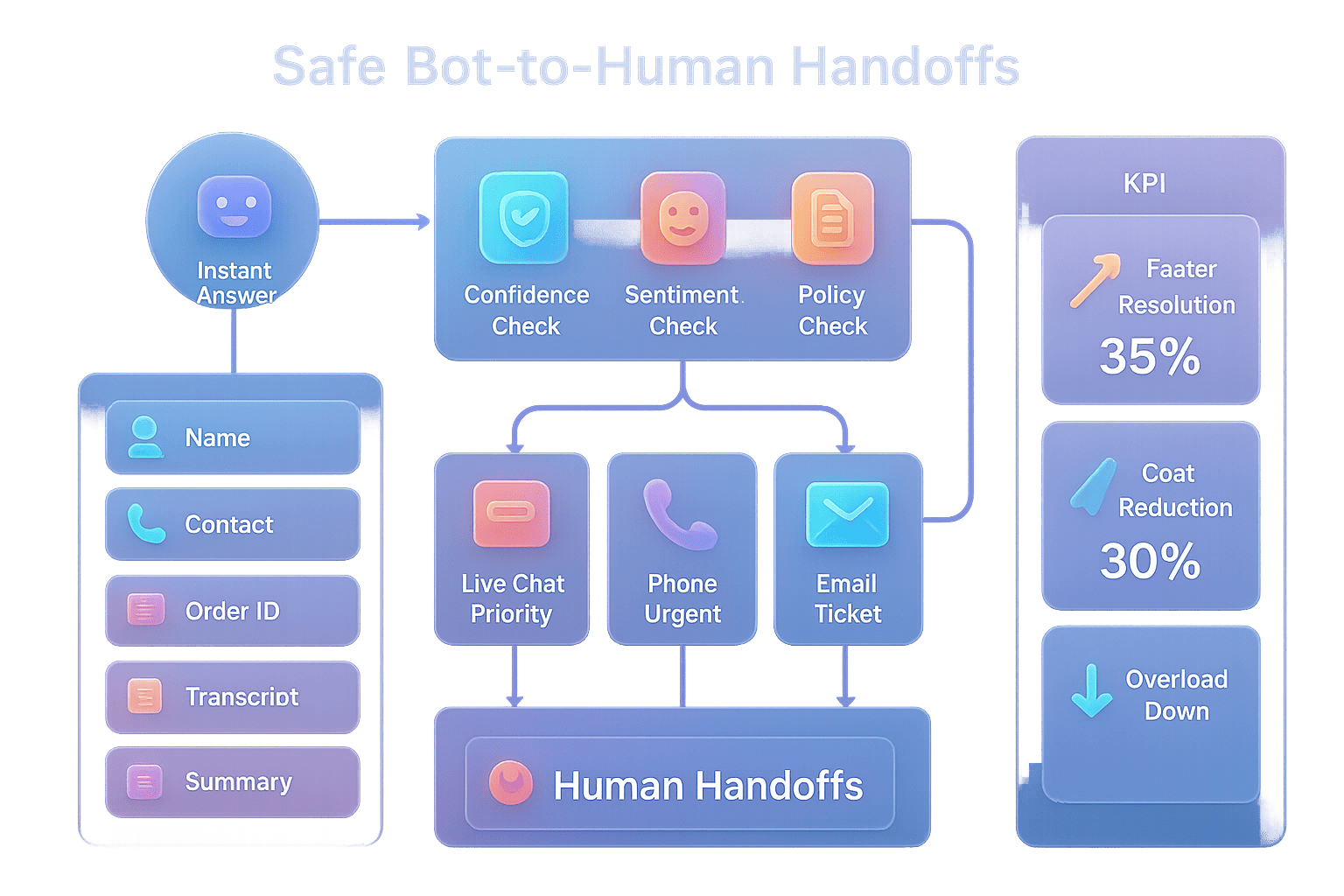
- ☐ Build simple flows and fallbacks: Draft how the bot greets, confirms intent, and offers helpful links. Add a clean escalation path to a human for complex or sensitive topics. If the bot is not sure, have it ask a clarifying question first, then try again with the new detail. Keep the language positive and practical so visitors feel guided, not blocked (ref: Noem.ai Sentiment Analysis Guide).
- ☐ Pilot with real queries: Turn on a soft launch where a portion of traffic hits the bot and you watch transcripts daily. Capture the top gaps and add quick fixes to your knowledge or prompt notes. This tight loop makes quality jump in just a few days. A small internal test group is great for fast feedback and low risk (ref: UseCarly).
- ☐ Monitor early metrics: Track deflection rate, first response time, and sentiment right away. Aim for 50 percent workload reduction in the pilot group so humans feel the benefit. When you see repeated misses, add content or adjust tone notes to fix them at the source. The goal is steady improvement, not perfection, and your data will show where to aim next (ref: Stack AI).
Week 3: Launch And Validate (Days 15 to 21)
- ☐ Go live to a bigger segment: Expand traffic and A/B test two greeting styles or answer formats. Train your team on how to jump in when the bot escalates and how to leave notes that the bot can learn from in future updates. Keep the brand voice clear and consistent as volume grows. Use simple dashboards to watch trends over a larger data set so you can trust the signals (ref: Noem.ai Sentiment Analysis Guide).
- ☐ Validate ROI with simple math: Add up human hours saved using your deflection and average handle time. Compare those savings to your Noem.ai cost so you see a clear multiple. Many small teams see 3x ROI in weeks when routine chats move off the plate. Share the win in your team meeting to build support for the final push in Week 4 (ref: ITxmen 30 Day Readiness)(ref: UseCarly).
- ☐ Track key stats that prove value: Watch first contact resolution, escalation rate, and CSAT daily. Keep FCR above 70 percent and escalations under 20 percent to show the bot is doing real work. Use sentiment trends to find which answers feel confusing and fix them with clearer wording. This simple rhythm gives you control and keeps the rollout on track (ref: Stack AI).
Week 4: Optimize And Scale (Days 22 to 30)
- ☐ Analyze the data for patterns: Look at the questions that show up the most and the ones that lead to escalations. Improve the top five by adding examples, links, and clarity. Small updates here can drive a 10 to 20 percent jump in containment quickly. This is where the payoff compounds because every fix helps future visitors at the same time (ref: UseCarly).
- ☐ Expand use cases and channels: Once your core flow is strong, add a second workflow like pre sales FAQs or order status. Try a hosted chatbot page on a custom domain for easy sharing in emails or QR codes. This lets you reach users who start outside your website while keeping everything in one place. It is a fast way to grow value without heavy dev work (ref: Noem.ai Hosted Page Guide).
- ☐ Create a simple playbook and team handoff: Document how to update content, read dashboards, and approve changes. Train two or three staff members so you are not the bottleneck. Keep the steps short and visual so people can repeat them without guessing. Clear handoff keeps momentum after the first month and protects your gains (ref: AI Implementation Checklist).
- ☐ Final metrics review and next goals: Aim for 30 to 50 percent team bandwidth freed by the end of day 30. If you miss a target, use your transcripts to find and fix the blockers. If you hit your goals, set month two targets for deeper answers or new pages. Always let the numbers guide your next step so you scale with confidence (ref: Stack AI).
Throughout the month, lean on the Noem.ai all in one stack so you move fast and keep quality high. The builder helps you shape answers, hosting and publishing make rollout simple, knowledge sync keeps content current, and analytics show what to fix next. This reduces the need to glue tools together or wait on custom code. The result is a steady weekly cadence of setup, testing, validation, and optimization that fits right into a small team rhythm (ref: Noem.ai Blog).
The Metrics That Matter And How To Read Them
A good chatbot rollout is a numbers game. You do not need dozens of charts, but you do need a few core metrics you can check every day in under 10 minutes. Here are the ones that show real progress and how to use them. Keep your targets simple in month one and raise the bar as your bot learns. Share the wins early and often so the team trusts the bot and keeps adding value (ref: UseCarly)(ref: Stack AI).
- Containment rate: This is the percent of sessions the bot handles without a handoff to a human. In the first 30 days, a 60 to 80 percent target is practical when your content is mapped and your flows are clear. If you are under 50 percent, look at the top three intents that fail and add better examples or links. Fixing the biggest gaps often unlocks a fast step up in performance because the same questions keep coming back (ref: UseCarly).
- First response time: This is how long it takes to show the first helpful answer. Good bots reply in under 10 seconds and often faster for short, known questions. Faster first replies reduce drop off and set the tone for the whole chat. If you see slow replies, trim your intro and use clearer prompts so the model gets to the point faster (ref: Noem.ai Blog).
- First contact resolution: This measures if the user got what they needed in one session. Aim for 70 percent or more in month one, and raise that target later. Use transcripts to find where users ask twice or leave without a next step. Then add a clarifying question or a short checklist inside the answer so the next user finishes in one go (ref: Stack AI).
- Escalation rate: This is the share of chats that need a human jump in. Keep it under 20 percent in your first month while you build confidence. If it spikes, the bot may be getting unclear or sensitive topics. Tighten your scope or add a better handoff path with notes so your team can respond faster and close the loop (ref: UseCarly).
- CSAT or thumbs up rate: This shows how helpful people feel the answers are. A target of 4.5 out of 5 or a high thumbs up share is a clear sign you are on track. Use short follow ups like Was this helpful to learn what to fix fast. Add small tone changes like I can help with that to make answers feel more human and kind (ref: Noem.ai Sentiment Analysis Guide).
- Time saved: Track hours returned to your team from deflected chats. A 30 to 50 percent workload reduction can happen in the first month if you scoped well and used live data to tune. Keep a simple weekly log so you can see progress and share it in team updates. This proof builds buy in for scaling the next use case in month two (ref: ITxmen 30 Day Readiness).
- Cost per resolved chat: Divide your bot cost by the number of fully handled chats. As volume grows, your cost per resolution drops while quality rises. This is one reason AI can be 70 to 90 percent cheaper than staffing for repetitive coverage. It is a simple, powerful way to explain ROI to stakeholders who care about the bottom line most of all (ref: UseCarly)(ref: ITxmen 30 Day Readiness).
To make tracking easy, place these metrics on a single dashboard and set weekly targets. Start each week by reviewing the biggest blocker and making one small fix. Then watch the next seven days to confirm the change moved the needle. That one change per week rhythm keeps progress steady without overloading your team. This also makes coaching easier because everyone knows what to fix first and why it matters (ref: Stack AI).
What To Expect, What It Costs, And Why Noem.ai Is Built For Speed
If you follow the plan above, here is what most teams see in the first month. First, response times drop to seconds, which reduces bounces and raises the odds that visitors try one more click or question. Second, your team stops answering repeats and starts focusing on tasks that need a human. Third, you get steady gains as you add examples, links, and better greetings that speak to your audience. A single source of truth and consistent tone make the whole experience feel smoother for both customers and staff (ref: Noem.ai Sentiment Analysis Guide).
On costs, AI chat support is usually far cheaper than hiring for the same coverage, especially nights and weekends. Small business guides point to savings of 70 to 90 percent versus staffing equivalent help for repetitive questions over time, and that does not include the speed and availability gains. Since you can pilot Noem.ai quickly and measure real numbers in 30 days, you do not have to guess. You can compare a month of resolved chats to your bot cost and have a clear answer. This lets you decide how to scale without a long commitment or custom code project (ref: ITxmen 30 Day Readiness)(ref: Stack AI).
As you expand, add the multichannel options and analytics included in the Noem.ai stack. Publish to a hosted page on a custom domain for easy sharing in emails or SMS. Use the analytics to spot high value topics and common friction points. Then improve those answers so every visitor after gets a better result. This compounding loop is how teams go from first wins to sustained gains month after month (ref: Noem.ai Hosted Page Guide).
The reason this works so well is focus. Noem.ai puts builder, hosting, knowledge sync, multichannel publishing, and analytics in one platform, so there is less to manage and fewer things that can break. Continuous auto sync and a clean prompt strategy keep answers current and on brand without extra meetings or training cycles. Usage based pricing keeps spend predictable while you learn and grow. That combination of speed, simplicity, and trust sets Noem.ai apart from piecemeal chatbot tools that need glue code and months of setup (ref: Noem.ai Blog).
Here are a few practical notes to keep your rollout clean and safe. Always label the bot clearly and make escalation easy to find. Keep sensitive topics out of scope in month one and add them later with care. Review transcripts weekly and remove any confusing phrasing that pops up more than once. Finally, use short links and readable headings in answers so people can skim and click fast. These small choices lift CSAT and reduce escalations at the same time (ref: Noem.ai Sentiment Analysis Guide).
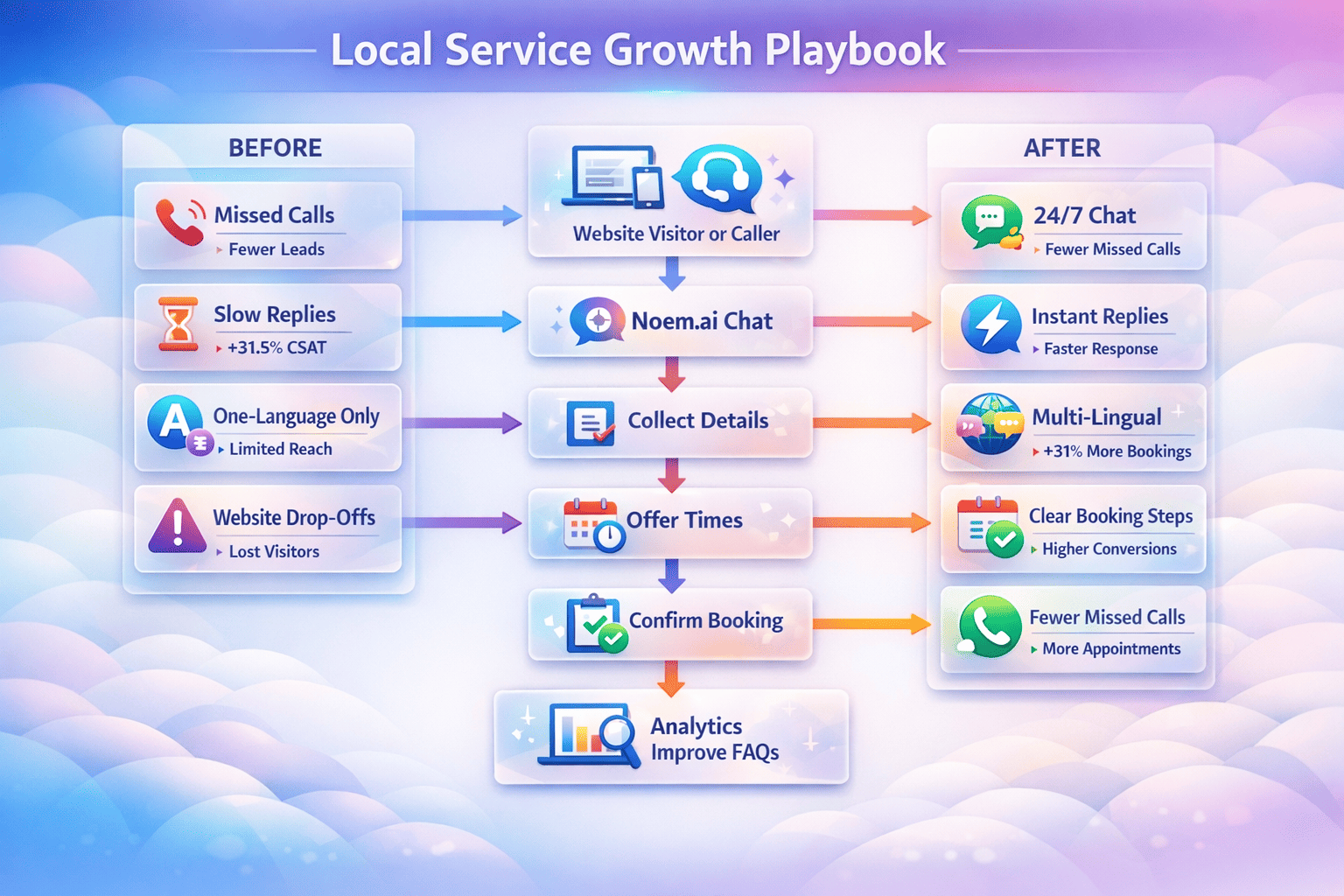
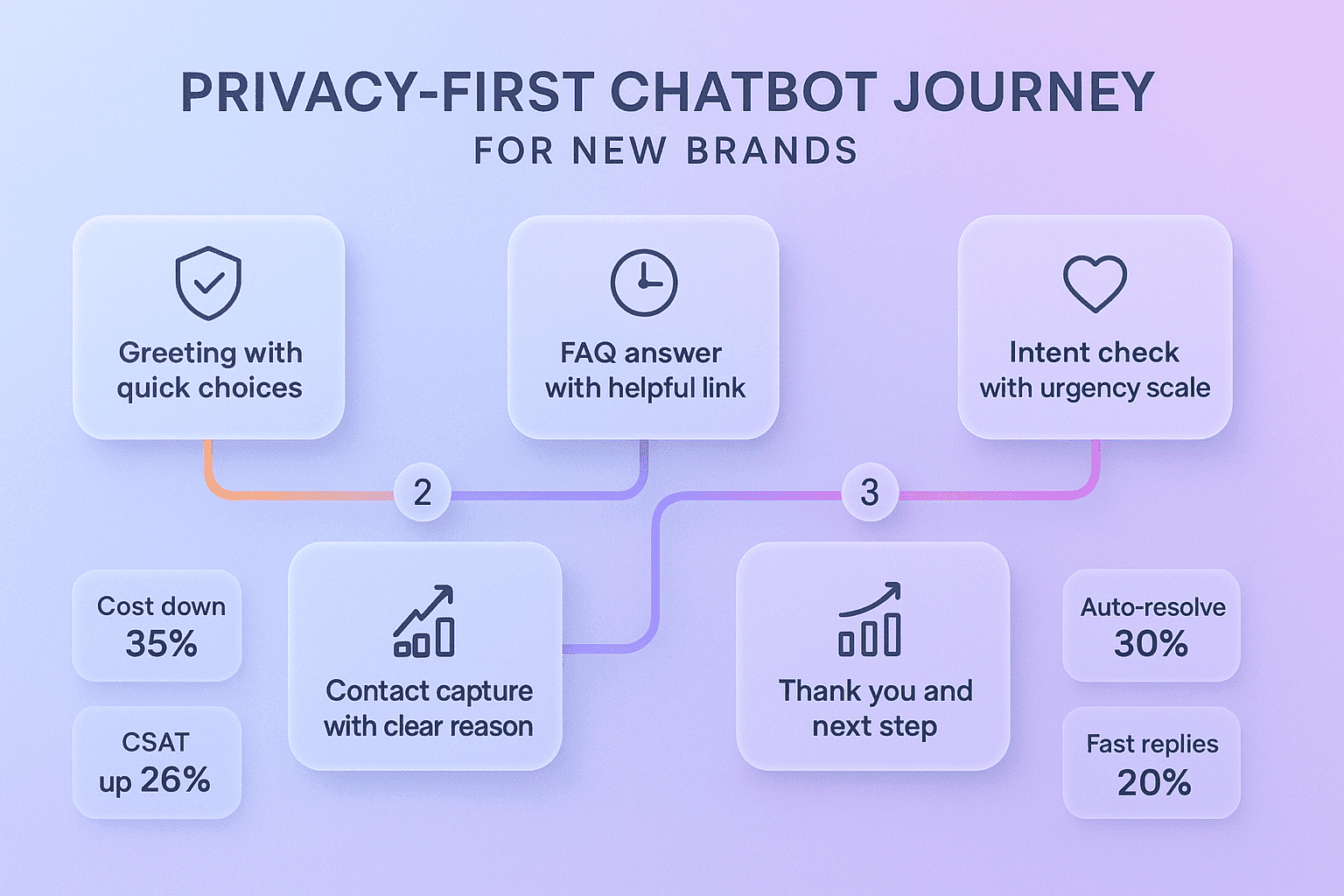
To make this practical, here is a quick example flow you can copy. Greet the visitor with a friendly one liner, ask a short clarifying question if needed, answer with one or two clear steps, then offer a link to go deeper or a button for a next action like Book a demo. If the user sounds frustrated, offer to bring in a teammate and pass a short summary. This flow keeps chats short, helpful, and easy to close out. You can build it in minutes using the Noem.ai builder and test it with a few common questions before you go live (ref: Noem.ai Blog).
Your 5 Step Action Plan To Start Today With Noem.ai
If you are ready to move, these five steps will get you live fast and set you up to measure real wins in 30 days. Keep it simple, focus on one core use case, and let the results tell you what to do next. That is the best way to build trust with your team and your customers. You will also avoid scope creep and long build cycles that slow you down. The goal is to ship, learn, and improve, not to write the perfect spec on day one (ref: Stack AI).
- Pick one high volume topic: Choose support FAQs or pre sales questions that repeat every day. Put five to ten real examples into your knowledge base so the bot can learn the patterns. Make sure your examples use the same words customers use so matches are tight. Avoid edge cases for now so you can prove value fast and without risk (ref: AI Implementation Checklist).
- Build and test inside Noem.ai: Use the builder to set a friendly tone, a clear greeting, and a short fallback if the bot is unsure. Test with your top 10 questions and adjust the wording until the answers feel right. Add a human handoff so your team can help when needed. Keep your first pass tight and fix misses daily during the pilot (ref: Noem.ai Blog).
- Embed on your site and ship a soft launch: Paste the code on your homepage and FAQ page so you get real traffic fast. Watch transcripts and mark common misses so you can add content or improve prompts. Keep your team in the loop and ask them to flag anything confusing or off brand. This builds shared ownership and improves trust quickly (ref: Noem.ai Blog).
- Track containment, response time, and CSAT daily: Put these on one sheet and color code them so you can see wins at a glance. Reward the team for improvements and ask for one quick fix each week. As the numbers rise, share the wins with leadership so you can expand scope with support. This keeps the whole company aligned around what is working and why (ref: UseCarly).
- Scale with a hosted page and multichannel: After your core flow is strong, add a hosted chatbot page on a custom domain to reach users from email, QR, or events. This taps new traffic sources without code or plugins. Keep analytics turned on so you can compare channel performance and invest where it works best. Grow by repeating the same tight build, test, and measure loop with one new use case at a time (ref: Noem.ai Hosted Page Guide).
Finally, remember that your edge is focus and speed. Because Noem.ai packs builder, hosting, knowledge sync, multichannel publishing, and analytics into a single stack, you have fewer moving parts and more time to improve the content that drives results. Continuous auto sync keeps answers current with your latest docs without manual work. And usage based pricing lets you start small and scale only when the numbers prove it. This is how small teams win fast and keep winning with clear data and simple steps (ref: Noem.ai Agent Guide).
Where To Click Next With Noem.ai
If you want instant response for customers and prospects, a lighter load for your team, consistent answers across sales and support, and lower operating costs than hiring, now is a great time to start. The 30 day plan above gives you a clear path to go live, measure success, and expand only when the data says yes. You can set up, embed, and pilot in just a few hours, then spend the rest of the month tuning for steady gains. To make it even easier, the Noem.ai guides walk you through each step so you can skip trial and error and focus on wins (ref: Noem.ai Blog)(ref: Noem.ai Hosted Page Guide).
Ready to free up bandwidth this month? Start your project in Noem.ai, paste the snippet, and track your first week of results. Then use your data to improve one small thing at a time. When you are ready to add a second use case, you will already have the rhythm and the proof. Will you ship your first quick win with Noem.ai this week?