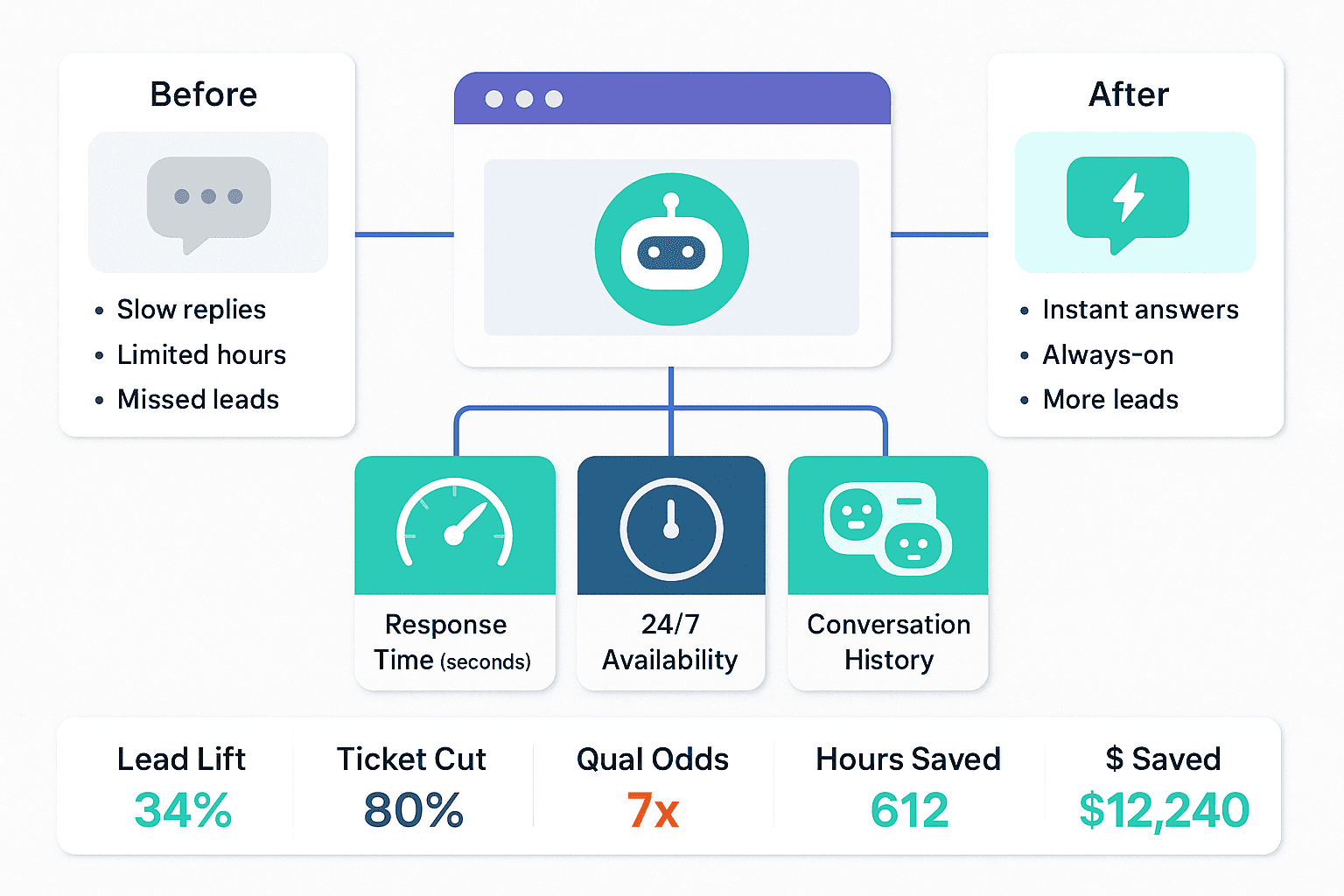
When your website is brand new, you must show progress right away. Leaders want to see how the site helps visitors, saves time, and brings in leads. A Noem.ai chatbot makes this clear by answering fast, staying on 24/7, and saving every chat so your team can act with confidence. You can see the results the same week you launch, right from the Noem.ai dashboard, including daily responses, top questions, and estimated time and cost saved for your team (examples show 612 hours and $12,240 saved) (ref: Noem.ai Help: Dashboard Metrics). With this view, you can prove value in plain numbers that anyone can understand.
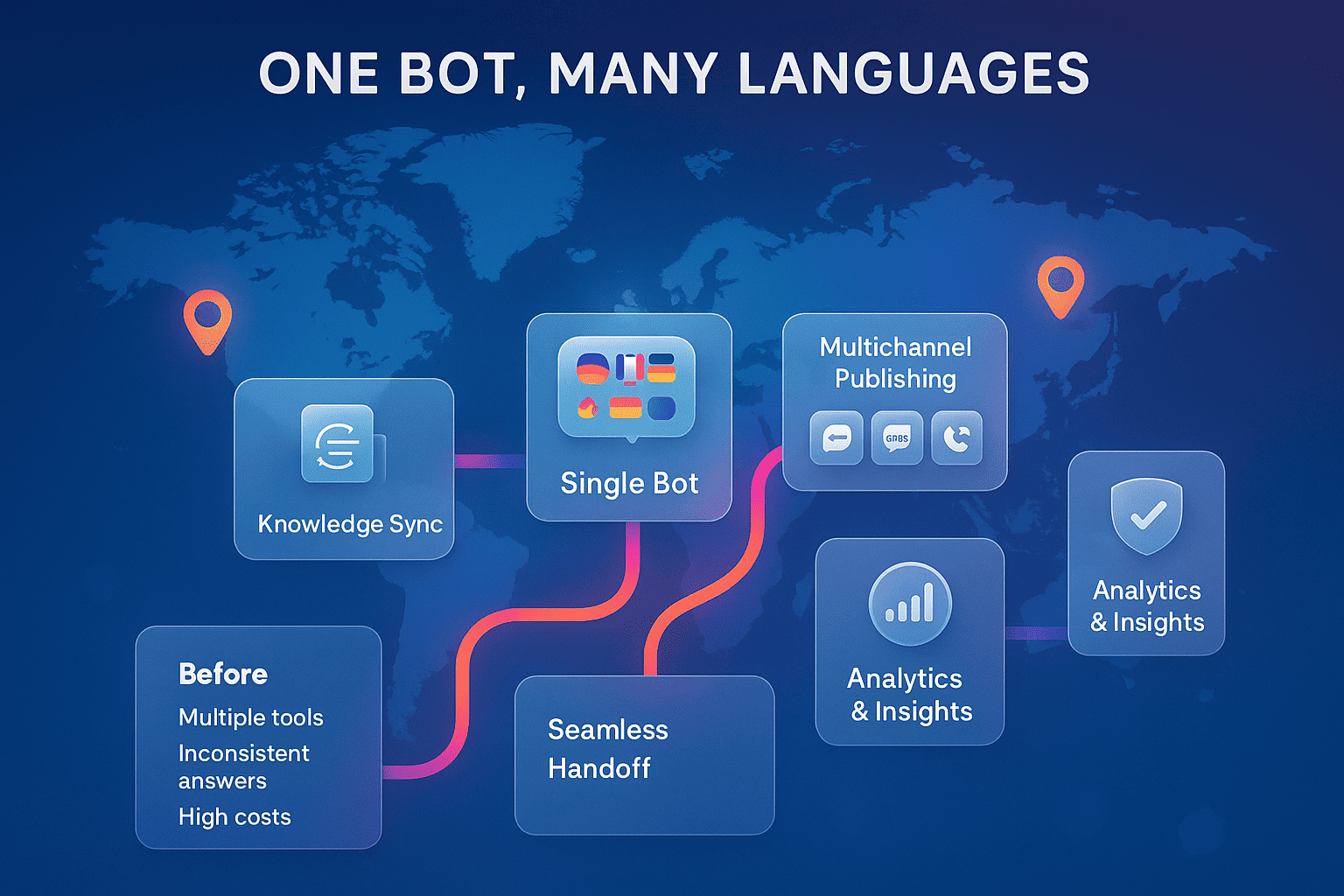
Noem.ai focuses 100% on chatbots, bringing builder, hosting, knowledge sync, multichannel publishing, and analytics into one simple stack so teams can go live in minutes, not weeks (ref: Noem.ai: Speed, Precision, Omnichannel). This speed matters, especially for new sites that need trust fast. The continuous auto-sync keeps your bot up to date as your content changes, so visitors always get the latest answers without extra work from your team (ref: Noem.ai: 15-Minute Setup). Because the pricing scales with use, you also avoid surprises while you grow, which is ideal for early-stage sites and lean teams (ref: Noem.ai: Amplify Strategic Thought). Together, these choices help you focus on the few metrics that matter most.
The best part is how these metrics map to outcomes your stakeholders care about. Faster replies help more visitors stay, click, and convert because people hate to wait (ref: Noem.ai: Speed, Precision, Omnichannel). Around-the-clock support means no “dead hours,” so more first touches become warm leads (ref: Noem.ai: 24/7 Chatbot Playbook). Lead capture directly connects chats to your sales funnel so you can track booked calls and revenue. And complete conversation history turns every chat into an insight you can act on tomorrow.
Two numbers stand out when teams launch with Noem.ai. First, users report an average 34% lift in conversion by tuning greetings and flows after reviewing early chat data (ref: Noem.ai: 24/7 Chatbot Playbook). Second, teams see up to 80% fewer routine support tickets when the bot handles the top questions, freeing your people to focus on higher-value work (ref: Noem.ai: Smarter Conversations). These two changes alone can make a new site look strong by the end of week one. That is the kind of progress that builds trust and momentum for your next steps.
The Four Metrics That Prove Value Fast
- Faster Response Times for Visitors: Speed wins online because people do not like to wait, and a quick reply keeps them engaged while intent is high. With instant answers from your Noem.ai chatbot, you cut time-to-first-response to seconds, not minutes, which reduces bounce and builds trust (ref: Noem.ai: Speed, Precision, Omnichannel). Track time-to-first-response and average response time each day in the dashboard to see how fast visitors get help (ref: Noem.ai Help: Dashboard Metrics). Faster replies connect to better lead outcomes; even moving from hours to minutes can mean many more qualified leads, with research often showing that replying within the hour multiplies qualification odds (ref: Noem.ai: 15-Minute Setup). Keep a simple daily log so you can show the trend improving.
- 24/7 Customer Support Availability: A new website should help even when your team is asleep, and 24/7 coverage makes that real. With Noem.ai, your bot answers day and night, which catches late-night shoppers and weekend researchers who would otherwise leave without help (ref: Noem.ai: 24/7 Chatbot Playbook). Track the share of chats that happen outside business hours and the percentage of questions handled without a human; many teams report up to 80% fewer routine tickets once the bot covers the basics (ref: Noem.ai: Smarter Conversations). This frees time for your team to work on sales and service tasks that need a real person, and the win is easy to show as reclaimed hours in the dashboard (ref: Noem.ai Help: Dashboard Overview). For new sites, this also means more touches turn into real leads any day of the week.
- Lead Capture from Website Conversations: When a visitor shares a name, an email, or a need in chat, that is gold. Noem.ai makes it simple to capture these details during the flow and send them to your CRM so your team can follow up while interest is fresh (ref: Noem.ai: 24/7 Chatbot Playbook). Track total captured leads, conversion to meetings, and conversion to sales; teams often see 34% average conversion lifts by refining the greeting, the questions, and the timing (ref: Noem.ai: 24/7 Chatbot Playbook). Also monitor which pages produce the best leads so you can invest in those pages and messages first (ref: Noem.ai: Customer Insights). When you show a direct tie between chats and booked calls, the value is clear to everyone.
- Complete Conversation History: Every chat is a signal that tells you what visitors want, what they cannot find, and what you should fix next. With Noem.ai, you get full histories and analytics, including sentiment trends, top topics, and where visitors stop or ask for more help (ref: Noem.ai Help: Dashboard Metrics). Track resolution rate, common questions, and patterns in low-sentiment moments so you can update your content and improve answers (ref: Noem.ai: Customer Insights). This turns chat data into a to-do list that raises satisfaction and lowers friction the very next week. Over time, your bot becomes smarter as your knowledge base grows and stays synced, so visitors get better answers without more work for your team (ref: Noem.ai: Speed, Precision, Omnichannel).
How to Read the Dashboard Like a Pro (Even on Day One)
Reading the Noem.ai dashboard is easy and fast. Start with the daily response count to see how many visitors use the bot and during what hours, then compare business hours to after-hours activity (ref: Noem.ai Help: Dashboard Overview). Look at time-to-first-response and average response time; aim for seconds, not minutes, and use the trend line to show week-over-week gains as you tune content (ref: Noem.ai Help: Dashboard Metrics). Move next to deflection or self-resolve rate, which shows you how many questions are answered without your team; rising deflection is a sign your content is clear and your bot is learning the right context (ref: Noem.ai: Smarter Conversations). Then check the captured leads count, meeting bookings, and downstream outcomes—this is where you connect chatbot activity to sales and pipeline (ref: Noem.ai: 24/7 Chatbot Playbook).
Use conversation history to guide quick fixes. If sentiment dips on a certain topic, add or update a help article and sync content, which Noem.ai does for you on an ongoing basis (ref: Noem.ai: Speed, Precision, Omnichannel). If visitors often ask for pricing, place a clear pricing link and a short answer in your knowledge base so the bot can handle it cleanly. If visitors seem lost on shipping, returns, or service areas, add a short FAQ and make sure the bot can find it. Check back in a few days to see if the low-sentiment topic improved. This simple loop helps you build a better site one fix at a time without a heavy lift for your team (ref: Noem.ai: Customer Insights).
You should also watch the estimated time and cost savings. The dashboard shows how many hours your bot likely saved by handling common questions and repetitive answers across the week (ref: Noem.ai Help: Dashboard Metrics). Many teams like to report this number in weekly updates to show the value in plain terms, such as 612 hours saved translating to $12,240, which is easy for leaders to grasp (ref: Noem.ai Help: Dashboard Metrics). For brand-new websites, this number can be a big reason to keep investing in content and updates. It also helps you forecast when to add more pages, offers, or prompts that fit what people are asking.
Finally, take a quick look at traffic sources tied to chat starts and captured leads. If organic search drives more chats than ads, invest more in the content that is working now. If ads drive a lot of chat starts but low-quality leads, try tightening your ad targeting or the bot’s greeting on those pages (ref: Noem.ai: Customer Insights). Keep changes small and test week by week. With Noem.ai, small tweaks compound fast because the platform keeps everything synced and simple, so you do not need a big rebuild to see better results (ref: Noem.ai: 15-Minute Setup).
Your Week-One, Prove-Value Plan (Copy This)
- Day 0–1: Launch and Baseline: Add the Noem.ai widget to your site—it takes about 15 minutes to get live—and confirm your knowledge sources are synced so answers match your latest content (ref: Noem.ai: 15-Minute Setup). Set a simple baseline for daily bot responses, time-to-first-response, and after-hours chat share (ref: Noem.ai Help: Dashboard Metrics). Turn on lead capture prompts in a friendly way and keep requests short and clear so more visitors share details (ref: Noem.ai: 24/7 Chatbot Playbook). Share the plan with your team so everyone knows the top four metrics you will report this week.
- Day 2–3: Tighten Answers and Pages: Review conversation history to find your top three question themes and check sentiment and resolution rate on each (ref: Noem.ai: Customer Insights). If a topic shows confusion, add a short FAQ and let the auto-sync update your bot’s knowledge so the next answers are clearer (ref: Noem.ai: Speed, Precision, Omnichannel). Make sure key pages like Pricing, Features, and Contact are easy to find and linked in the bot’s answers. Check the dashboard again to confirm time-to-first-response is still in seconds and deflection is holding or rising (ref: Noem.ai Help: Dashboard Overview). Small tweaks now lead to clear gains by week’s end.
- Day 4–5: Optimize Lead Capture Moments: Look at where leads are captured and where they drop. Test a shorter greeting, a clearer value line, or a simple next step like “Book a quick call” on your top pages (ref: Noem.ai: 24/7 Chatbot Playbook). Keep the ask small—name and email first—then ask a helpful follow-up, like the visitor’s goal or timeline. Track any lift in captured leads and booked calls; many teams see double-digit improvements in just a few days when they refine the greeting and timing (ref: Noem.ai: 24/7 Chatbot Playbook). Share early wins with your leaders to keep support high.
- Day 6–7: Show the Score and Set Next Steps: Pull a simple one-page report with these numbers: average response time, after-hours chat share, deflection rate, leads captured, estimated hours saved, and any booked meetings (ref: Noem.ai Help: Dashboard Metrics). Add two insights from conversation history and one content fix you made that improved sentiment (ref: Noem.ai: Customer Insights). Tie the results to revenue impact—for example, a 34% average lift in conversions after tuning flows is a clear headline for leaders (ref: Noem.ai: 24/7 Chatbot Playbook). Close with a plan for week two, like adding two FAQs and testing a new greeting on your highest-traffic page. This rhythm keeps you focused on what matters and builds momentum every week with Noem.ai.
What Good Looks Like (Benchmarks You Can Share)
You do not need a complex setup to report success. Focus on a few simple targets that new websites can reach in the first two to four weeks. First, get time-to-first-response down to a few seconds and keep it there by checking your dashboard daily (ref: Noem.ai Help: Dashboard Overview). Next, raise your after-hours chat share by making sure your bot is visible on mobile and on key landing pages so late-night and weekend visitors know help is there. Pair this with a friendly lead capture moment, and your captured leads count should start to grow week by week (ref: Noem.ai: 24/7 Chatbot Playbook).
If you answer the top five questions well, you should see fewer routine support requests as the bot handles more of the load. Many teams report up to 80% fewer routine tickets when these basics are covered, which frees 10 or more hours per week for other work (ref: Noem.ai: Smarter Conversations). That is a stat any leader understands because it translates directly to time saved and better focus. Keep an eye on estimated time saved in the dashboard and share that weekly number; examples showing 612 hours and $12,240 saved make the value hard to miss (ref: Noem.ai Help: Dashboard Metrics). With Noem.ai, you do not need a heavy tech stack to reach these marks.
Lead capture should also feel steady and growing. After tuning your greeting and prompts, a 34% average lift in conversions is common, which means more booked calls and more sales opportunities from the same traffic (ref: Noem.ai: 24/7 Chatbot Playbook). If you sell online, you may also see fewer drop-offs when answers come fast during checkout; an always-on helper reduces friction when buyers have last-minute questions (ref: Noem.ai: Ecommerce Growth). The conversation history then helps you spot sticking points, like unclear pricing or shipping, so you can fix them once and help every future visitor. This is how a small set of KPIs turns into steady growth without a large team.
To keep things simple, put your report into three parts each week. First, show the numbers: response time, after-hours share, deflection, leads, hours saved, and any booked calls or sales. Second, list two insights from chat history, with links to example chats so leaders can see what visitors asked and how the bot helped (ref: Noem.ai Help: Dashboard Metrics). Third, share the one change you will make next week—like adding a new FAQ or refining the lead prompt—to keep the trend moving. This quick report style keeps attention on outcomes, not tools, and it works because Noem.ai bundles builder, hosting, sync, and analytics in one clean stack (ref: Noem.ai: Speed, Precision, Omnichannel).
Common Pitfalls to Avoid (So Your Numbers Keep Rising)
- Asking for too much, too soon: If your bot asks for a phone number, budget, and company size right away, many visitors will bounce. Start with a light ask—name and email—and use a friendly line about how sharing helps you tailor answers (ref: Noem.ai: 24/7 Chatbot Playbook). Then follow up with one or two helpful questions that feel natural, like role or goal. This makes lead capture smoother and improves conversion quality without adding pressure. It also creates a better first impression for your new site.
- Hiding your bot on key pages: If the bot is only on the home page, you miss high-intent moments on pricing, features, and checkout pages. Make sure your Noem.ai widget is visible on these pages and on mobile, since many visitors start on phones (ref: Noem.ai: Speed, Precision, Omnichannel). Keep the trigger friendly and not too pushy; let the visitor drive the chat when possible. A small change in placement can make a big change in leads captured. Monitor page-level chat starts to see what is working (ref: Noem.ai: Customer Insights).
- Letting knowledge go stale: If your pricing, features, or hours change, your answers must change fast. Noem.ai keeps your bot synced to your content, so use this to your advantage by keeping your docs and FAQs current (ref: Noem.ai: Speed, Precision, Omnichannel). When visitors see correct, consistent answers, trust grows quickly on a new site. Recheck low-sentiment topics once a week until they improve (ref: Noem.ai: Customer Insights). This habit builds a reliable help experience over time.
- Failing to share wins early and often: Quiet wins can get missed in busy weeks. Build a simple dashboard snapshot for leaders that highlights response time, leads captured, and estimated hours saved—these are easy to understand and show progress fast (ref: Noem.ai Help: Dashboard Overview). Share a short chat transcript that shows the bot solving a common issue; leaders love real examples. When people see value, they support more content and more tests. That support helps you grow faster with the same simple stack from Noem.ai.
A Simple Scorecard You Can Reuse Every Week
Here is a lightweight scorecard format you can copy and paste into your weekly email. It keeps attention on results and makes trend lines easy to see. Use it to report the four core metrics, plus time and cost savings, in a clear way that supports fast decisions (ref: Noem.ai Help: Dashboard Metrics). Pair the numbers with one insight from conversation history and one planned change. Over a few weeks, this rhythm turns small wins into large gains for your new site.
- Response Time (Seconds to First Reply): Report the average and best day this week, plus last week’s number. Explain one fix you made if the number improved. A drop from minutes to seconds is a clear story anyone can understand (ref: Noem.ai: Speed, Precision, Omnichannel). Keep the goal visible each week.
- 24/7 Coverage and Deflection: Share the percent of chats after hours and the share resolved without a human. Connect this to estimated hours saved in the dashboard; tie it to one team task you can now do because time was freed (ref: Noem.ai: Smarter Conversations). This kind of story helps leaders see how the bot supports growth without adding payroll (ref: Noem.ai: Amplify Strategic Thought). Keep your definitions simple so the scorecard is easy to read.
- Lead Capture and Conversion: Report total captured leads and any booked calls or sales connected to chat this week. Note the page that drove the most leads and the message that worked best so you can repeat it (ref: Noem.ai: 24/7 Chatbot Playbook). If you saw a lift after a greeting change, include the before and after in one line. Over time, this creates a cookbook of what works for your audience.
- Conversation Insights (History and Sentiment): Pick one theme that stood out and how you fixed it—like adding a new FAQ that raised resolution rate. Note any shift in sentiment so people see progress (ref: Noem.ai: Customer Insights). If a topic still struggles, share your plan to update content next week. Keeping this loop going keeps your bot and your site growing together.
Ready to See These Numbers on Your Site This Week?
If you want a new website to show value fast, focus on simple KPIs that leaders care about: faster response times, 24/7 availability, captured leads, and complete conversation history. With Noem.ai, you can launch in minutes, watch the dashboard in real time, and make small, smart updates that turn into clear wins (ref: Noem.ai: 15-Minute Setup). Users report 34% average lifts in conversion and up to 80% fewer routine tickets as early changes take hold, which makes the value hard to miss (ref: Noem.ai: 24/7 Chatbot Playbook, Noem.ai: Smarter Conversations). That is the kind of report that gets a thumbs-up right away. Want a quick walkthrough and a scoreboard template you can use on Monday? Try the simple stack from Noem.ai and see your first wins this week.