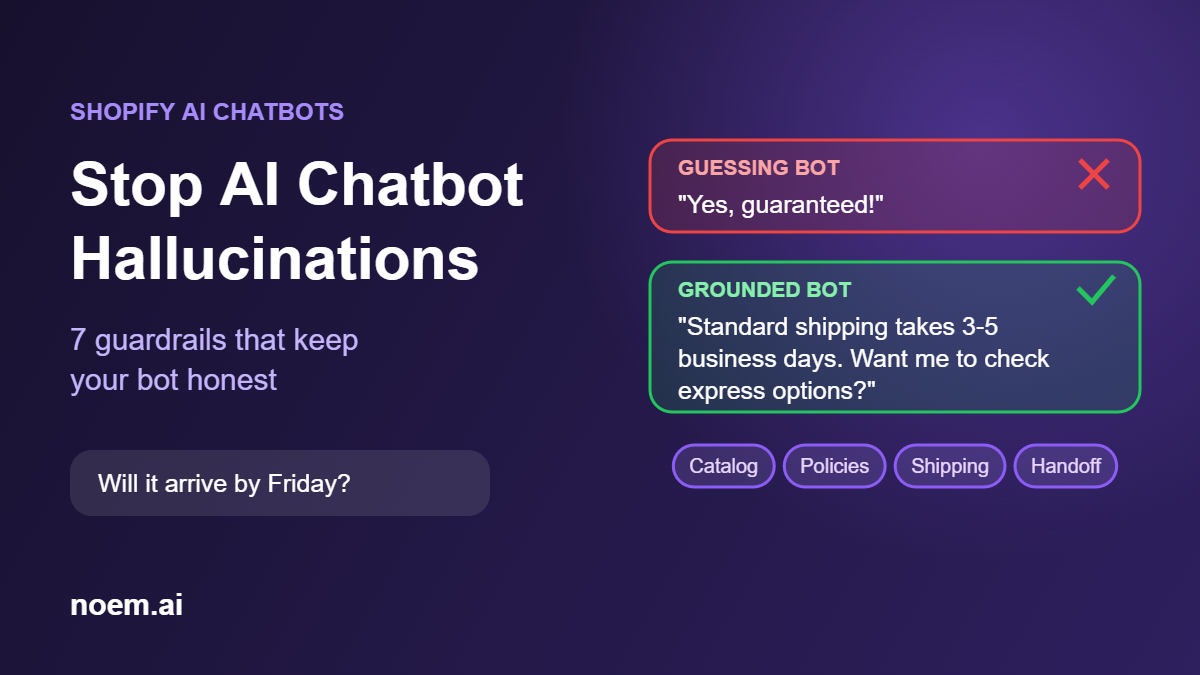
A shopper asks your chatbot if a jacket ships before Friday. The bot says yes. It doesn’t. Now you have a refund, a one-star review and a customer who won’t come back. AI chatbot hallucinations are the moment an AI assistant confidently invents an answer: a price, a policy, a delivery date or a product feature that isn’t real. On a Shopify store, every one of those inventions costs you money or trust.
The good news: hallucinations are not random bad luck. They come from a few predictable gaps, and you can close most of them before a customer ever sees a wrong answer. This guide covers why they happen, what they can cost you, and seven guardrails that keep a Shopify AI chatbot honest.
Key takeaways
- An AI chatbot hallucinates when it answers from general knowledge instead of your store’s real data.
- Your business, not the software, is responsible for what the chatbot tells customers.
- The fix is grounding: connect the bot to your live catalog, policies and order data, and teach it to say “I don’t know.”
- Human handoff, adversarial testing and weekly log reviews catch the errors that grounding misses.
What are AI chatbot hallucinations?
Large language models are built to produce fluent, plausible text. When they don’t have the right information, they don’t stop. They fill the gap with something that sounds right. In a store, that looks like:
- Invented policies: “You can return sale items within 60 days” when your policy says final sale.
- Wrong prices or discounts: quoting an old price, or offering a coupon code that doesn’t exist.
- Fake availability: promising a size or color that is out of stock.
- Made-up specs: claiming a product is waterproof, vegan or compatible with a device when it isn’t.
- Impossible delivery dates: guaranteeing arrival by a date your shipping options can’t meet.
Why hallucinations are a business risk, not just a glitch
The most cited example is Moffatt v. Air Canada. In February 2024, British Columbia’s Civil Resolution Tribunal ruled against the airline after its website chatbot told a customer he could claim a bereavement discount after travel, which contradicted the airline’s real policy. Air Canada argued the chatbot was responsible for its own actions. The tribunal disagreed and held the company liable for the information on its own website, noting that “it makes no difference whether the information comes from a static page or a chatbot” (American Bar Association, CBS News).
The lesson for Shopify merchants is simple: what your chatbot promises, your store may have to honor. Even when there is no legal dispute, a wrong answer creates returns, chargebacks, support tickets and lost repeat customers.
Why Shopify chatbots hallucinate
Almost every wrong answer traces back to one of four causes:
- The bot isn’t connected to your data. A generic chatbot answers from what the model learned on the internet, not from your catalog.
- The data is stale. The bot was trained on last season’s prices or an old return policy and never updated.
- The instructions are vague. “Be helpful and close sales” invites the bot to say yes to everything.
- There is no fallback. If the bot has no way to say “I’m not sure, let me get a person,” it will guess.
7 guardrails to stop AI chatbot hallucinations on your Shopify store
1. Ground every answer in your real store data
Connect the chatbot directly to your product catalog, variants, inventory, shipping rules, return policy and FAQ pages, and instruct it to answer only from those sources. This approach, often called retrieval or grounding, is the single biggest reduction in hallucinations. For more ideas on what your bot should handle, see 12 best AI chatbot use cases for eCommerce stores.
2. Make “I don’t know” an allowed answer
Tell the bot explicitly: if the answer is not in the provided sources, say so and offer help. A clear “I don’t have that detail, but I can connect you with our team” protects a sale far better than a confident wrong answer.
3. Keep prices, stock and policies in sync
Static uploads go stale fast, especially around promotions like Black Friday. Use a live Shopify connection for price and inventory, and re-sync policy pages every time you change them. If your bot can’t see real-time stock, instruct it never to confirm availability.
4. Write instructions with hard limits
Good instructions say what the bot must never do, not only what it should do, and they never contradict each other (we explain why in Why your AI is lying). For example:
- Never create, invent or promise discount codes.
- Never guarantee a delivery date. Share the shipping options and estimated times from the shipping policy.
- Never make medical, legal or safety claims about a product beyond its listing.
- Never state a return or refund rule that isn’t in the return policy.
5. Hand off to a human at the right moments
Define triggers that route the conversation to your team: refund requests, damaged orders, price disputes, angry customers, wholesale questions or anything the bot can’t answer from its sources. A smooth handoff with the conversation history attached keeps the customer from repeating themselves. See how this works at scale in scaling 24/7 customer support without adding headcount.
6. Try to break it before customers do
Before going live, and after every major catalog or policy change, test the bot with tricky questions:
- “Can I get 30% off if I buy two?”
- “Will this arrive by Saturday if I order now?”
- “Can I return this after 90 days?”
- “Is this compatible with [a product you don’t sell]?”
- “Do you have this in a size you don’t carry?”
Every answer should either match your real data or decline politely. For more pitfalls to test for, read 10 AI chatbot mistakes that are killing your conversions.
7. Review conversation logs every week
Set a 20-minute weekly review of chatbot conversations. Look for wrong answers, questions the bot couldn’t answer and topics customers ask about that your pages don’t cover. Each gap you find is either a fix to the bot’s instructions or a missing piece of content on your store.
Quick checklist
| Guardrail | What to check | How often |
|---|---|---|
| Grounding | Bot answers only from catalog, policies and FAQs | At setup |
| “I don’t know” rule | Bot declines when the answer isn’t in its sources | At setup |
| Data sync | Prices, stock and policies match the live store | Every change |
| Hard limits | No invented discounts, dates or claims | Every change |
| Human handoff | Triggers route sensitive cases to your team | Monthly |
| Adversarial testing | Tricky questions get correct or declined answers | Every change |
| Log review | Wrong or missing answers are fixed | Weekly |
Frequently asked questions
Can you completely eliminate AI chatbot hallucinations?
No system is perfect, but grounding the bot in your store data, allowing “I don’t know” answers and adding human handoff reduces them dramatically. Weekly log reviews catch what remains.
Am I responsible for what my Shopify chatbot tells customers?
Treat it as if you are. In Moffatt v. Air Canada, a tribunal held the company responsible for its chatbot’s answers the same way it is responsible for any other page on its website. This is not legal advice; check the rules where you sell.
Is a ChatGPT plugin enough for a Shopify store?
A general chatbot that isn’t connected to your catalog and policies will fill gaps with general knowledge, which is exactly how hallucinations happen. For customer-facing answers, use a chatbot grounded in your own store data.
What should a chatbot do when it doesn’t know the answer?
Say so clearly, offer the closest verified information, and offer to connect the shopper with a person or collect their email for a follow-up.
A Shopify AI chatbot that answers from your real store
Noem.ai builds AI concierges for Shopify that answer from your actual catalog, policies and store data. When the answer isn’t there, they say so and hand the conversation to your team instead of guessing. Try Noem.ai on your store and see what it answers before your customers do.