A simple chat can change a visit into a real lead. In this guide, you will learn how lightweight conversation flows on site-builder pages collect contact info and intent without long forms or complex steps. The goal is to help you create better-qualified sales opportunities with less work and more speed. We will focus on how quick answers, plain language, and friendly prompts drive higher conversion rates. We will also show how this works 24/7 so your site keeps helping people even when your team is asleep.
Subtitle: Capture contact info and intent in minutes, not weeks, with simple, friendly chats that work right inside your site-builder pages.
Key Points
- Lightweight flows on site-builder pages
- Ask short, clear prompts
- Capture email and intent inside chat
- Faster response time means more leads
- Works 24/7 for sales and support
- Launch in minutes, no code required
- Measure deflection and FCR
- Seamless handoff with full context
Why Lightweight Conversation Flows Beat Static Forms On Site-Builder Pages
Static forms often feel like a stop sign. Visitors hit the form, feel the friction, and many leave before sharing anything. Lightweight conversation flows are different because they ask short, friendly questions and respond right away. On site-builder pages, these chats blend into your layout and feel like part of the visit, not a roadblock. This simple shift helps you turn more visitors into qualified leads while keeping your site easy to use for everyone.
When a visitor chats, they share what they need in their own words. The flow can then ask one clear follow-up question, like what problem they want to solve or what timeline they have. This makes each step feel helpful, not heavy. It also lets you collect the right info at the right time, like an email after you have already added value. This timing improves trust and raises your chance of getting a real reply (ref: Noem.ai).
These flows shine on site-builder pages because they fit any template and look great on mobile. You can place the chat on your home page, pricing page, or a hosted FAQ page and keep the same friendly tone. Updates are quick, so you can keep your prompts short and clear as you learn what users ask most. That keeps your bot helpful and your lead quality strong over time (ref: Noem.ai Help).
Fast answers also lower bounce. Visitors do not want to wait minutes for help. With chat, the first reply lands in seconds and keeps the visitor engaged. Speed like this is one reason chat tends to lift completion rates versus forms, and it often helps you reduce response time on websites in a way that keeps people moving forward to a next step (ref: Noem.ai).
- Bold, simple prompts: Short prompts are easier to read and answer than long scripts. People skim, so one short question per step wins more replies and keeps the flow going. Prompts like What brought you here today or Want a quick 15-minute demo this week are easy to say yes to. This helps create better-qualified sales opportunities because the chat learns the visitor’s need in their own words before asking for contact details (ref: Noem.ai).
- Email capture inside the chat: Instead of a pop-up or redirect, the chat asks for email or phone as part of the talk. It can offer a next step, like Send a summary to your inbox or Share a price guide. Because the visitor already got value, they are more likely to share details. This turns visitors into qualified leads while keeping the chat friendly and calm (ref: Noem.ai Help).
- Always current content: When your content updates, your chat should match it. Auto-sync keeps answers aligned with your latest site pages so the bot does not share old info. That builds trust across your site-builder pages and helps more people find the right next step. This also supports sales and support conversations 24/7 with accurate guidance (ref: Noem.ai).
- Less work to go live: You do not need long projects or a big build. With a single stack that covers builder, hosting, and analytics, teams move fast. That means you can test a flow this morning and ship it on your site-builder page today. Going live in minutes helps you learn faster and improve faster (ref: Noem.ai).
How To Set Up Lightweight Flows On Site-Builder Pages In Minutes
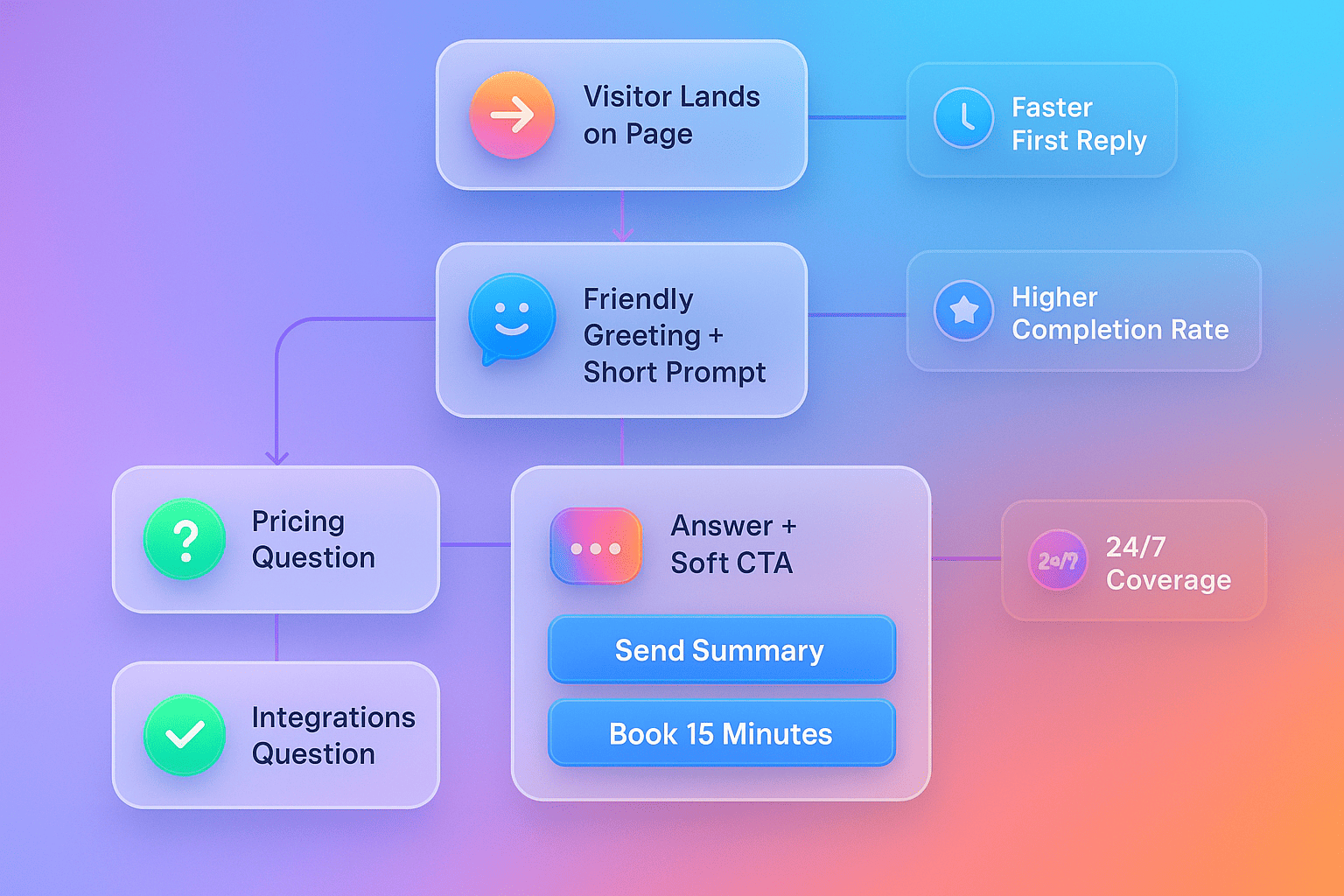
You can launch a simple, effective flow today with a short list of steps. Start by writing a plain-language greeting that matches your brand voice. Keep it helpful and short, and then ask one question that respects the visitor’s time. Offer a quick choice, like Explore pricing, See integrations, or Talk to a person. Each path should lead to a helpful answer and a soft way to share contact info.
Next, map the top three questions you see most. These are usually about pricing, setup, or fit. Prepare one-sentence answers for each and add one follow-up prompt, like Would you like a 2-page guide or Should I book 15 minutes. This pattern solves the visitor’s need and earns permission to follow up. It also supports a smooth handoff if a human needs to help, because the chat has already gathered context (ref: Noem.ai Help).
On your site-builder, place the chat where intent is high. The pricing page, a product page, or a comparison page are perfect spots. If you have a hosted chatbot page, link to it from your main menu or your footer so people can find answers fast. You can also publish a dedicated page for support questions that the chat can answer day and night. This helps reduce response time on websites and builds trust because people get help right away (ref: Noem.ai Help).
Finally, keep your tone friendly and simple. Use short lines. Avoid big blocks of text. The best flows feel like a helpful guide walking beside the visitor. This style works well for both sales and support, because it reduces stress and makes every step clear (ref: Noem.ai).
- Build with plain language: Use everyday words and short sentences. Make each answer fit on a phone screen without scrolling. This makes your chat easy to read for everyone, and it helps people reach a yes faster. It is a simple move that drives higher conversion rates (ref: Noem.ai).
- Offer clear next steps: At the end of each path, give two options. For example, Get a quick demo this week or Email me a 2-minute overview. Choices like these let the visitor choose their pace and format. That freedom raises the chance they will share contact info so you can turn visitors into qualified leads (ref: Noem.ai).
- Keep data tidy: Make sure each captured email or phone number is stored with the chat context. When a person follows up, they can see what the visitor asked and what answer they got. This cuts repeat questions and keeps the talk moving forward. It also supports better first-contact resolution over time (ref: Noem.ai Help).
- Publish across channels: Start on your website, then extend to a hosted page and other surfaces you use. Keep the same flows so context follows the visitor. This builds trust and keeps the momentum going from the first touch to the next step. It also helps your team stay consistent and efficient (ref: Noem.ai).
Speed, 24/7 Help, And Friendly Handoffs Create Better-Qualified Sales Opportunities
Speed matters because people expect answers now. With chat, visitors get a first reply in seconds, not minutes, which means fewer people bounce and more keep talking. Faster response time is closely tied to higher conversion rates because it removes doubt and shows you are ready to help. When this happens on every page, you create a calm, helpful rhythm that makes visitors more open to sharing contact info. That is how you go from a click to a real conversation.
Being available 24/7 is also a big win. Many visitors browse after hours or on weekends. A chat that can greet them, answer a few key questions, and ask for an email for a follow-up keeps your pipeline full around the clock. It also lowers the number of simple tickets your team needs to answer. Over time, this shifts your team’s focus to higher-value conversations and better-qualified sales opportunities (ref: Noem.ai).
When the chat does need to bring in a person, context is the key. A smooth handoff includes the full chat history so the visitor does not have to repeat anything. This lowers average handle time and keeps the tone friendly and on-brand. Clear metrics like deflection rate and first-contact resolution help you see progress and tune your flows with purpose. These are standard measures for chat quality and can be tracked at scale with simple dashboards and review loops (ref: Dropbox Tech).
Video guides and quick-start tutorials can make setup even faster. Short demos show how to place a chat on your site-builder page, how to write prompts, and how to test flows live. This is helpful for small teams that want a fast launch without heavy projects. A few focused minutes of setup can unlock days of time savings later. With the right starter templates, you can ship in one session (ref: YouTube, ref: YouTube).
- Faster first reply: A quick hello keeps people engaged and lowers bounce. When a visitor sees a response right away, they feel heard and are more willing to continue. This simple win helps reduce response time on websites and nudges more visitors toward sharing contact info. It is one of the fastest paths to higher conversion on a page that gets steady traffic (ref: Noem.ai).
- 24/7 coverage: Night and weekend traffic should not go to waste. A helpful chat can answer the top questions, collect intent, and offer a next step any time. Over time, this builds a steady flow of qualified leads from hours you were not using before. It also supports sales and support conversations 24/7 without adding friction for your team (ref: Noem.ai).
- Clear handoffs with context: If a person needs to join, they should see the full chat. This stops the back-and-forth that can slow things down and frustrate the visitor. A clean history view makes it easy to pick up the thread and move to a next step. That is how you keep trust high and handle complex questions well (ref: Noem.ai Help).
- Consistent tone across pages: Your chat should sound like your brand, not a script. Keep the tone friendly for FAQs, calm for billing, and clear for pricing. Consistency builds comfort and helps visitors feel safe sharing details. This small style choice can have a big impact on lead quality over time (ref: Noem.ai).
A Simple Playbook: Flows, Prompts, And Soft CTAs That Earn The Follow-Up
Use this playbook to draft a flow you can ship today on your site-builder page. Start with a greeting that sets expectations, then route to the top three topics you handle most. After each helpful answer, ask a soft and friendly question that invites the visitor to choose a next step. Keep each step short, and always give a way to share contact info in exchange for something helpful. That is how you turn a short chat into a sales-ready conversation.
Here is a sample greeting and path: Hi, I am here to help with pricing, setup, and fit. What brought you here today. When the visitor answers, the chat gives a one-sentence reply and a choice. For pricing: We have flexible plans for teams of all sizes. Want me to send a one-pager or book 15 minutes. For setup: You can go live on a hosted page in minutes. Want me to email a 2-step guide or connect you with a specialist. Each step adds value, then asks for contact info in a natural way (ref: Noem.ai Help).
You can also add a quick qualifier early in the chat. Ask about team size, use case, or timeline with a short choice list. Then tailor the next prompt. For example, If they say they need something this month, ask, Want a quick demo this week. This makes the flow feel personal without adding complexity (ref: Noem.ai).
Keep the soft CTA friendly and clear. Try Want me to send a summary to your inbox or Would a 10-minute video help you decide. Make sure every CTA offers value. If you promise a guide, send it fast. If you offer a call, share a few times. This builds trust and keeps momentum going to the next step (ref: Noem.ai).
- Pricing path: Share a short overview of plans and who they fit best. Offer an email summary or a 15-minute demo slot as the next step. Ask one follow-up to learn budget range or timeline. This keeps the talk moving and positions your team to continue with a clear plan (ref: Noem.ai).
- Setup path: Explain that setup takes minutes on a hosted page and works on your site-builder. Offer a 2-step getting-started email with screenshots. If the visitor wants a person, collect a time window and email inside the chat. This keeps the entire journey smooth and simple (ref: Noem.ai Help).
- Fit path: Ask What job are you trying to do today and give two choices, like Support or Sales. Based on the answer, share one clear benefit. Then ask if they want a use-case sheet or a short call. These micro-choices help create better-qualified sales opportunities because you learn intent fast (ref: Noem.ai).
- Follow-up path: After value is given, ask for the best email to send the promised material. Confirm what you will send and when. Thank them by name to keep it warm. Then note the interest and context so your next touch is specific and helpful (ref: Noem.ai Help).
Measure, Learn, And Improve: What To Track And Why It Matters
Great flows get better with simple tracking. Start with time to first response, completion rate for email capture, and percentage of chats that reach a next step like send a guide or book time. Add deflection rate for support flows and first-contact resolution for both support and pre-sales questions. These numbers show where visitors slow down and where your prompts need to be shorter or clearer. When you tune one step at a time, your whole flow gets stronger.
Qualitative review also helps. Read a small sample of chats each week and tag the most common questions. Notice where people hesitate or ask a second time. Tighten those answers. Make sure each reply is one sentence and ends with a small choice. This keeps the visitor in control and helps them say yes to a next step more often (ref: Dropbox Tech).
Use a simple dashboard to watch trends over time. Look for rising completion rates and lower time to first response. Aim to raise the number of chats that end with a follow-up action. Keep the changes small so you can see what works. When you find a winning prompt, reuse it across pages where it fits (ref: Noem.ai).
Make sure you keep your content fresh. If your pricing page changes, your flow should change with it. If you add a new feature, add a short answer and a soft CTA that offers a guide or a short video. When your chat learns from your site, it stays useful and honest. That builds trust and keeps conversion steady over time (ref: Noem.ai).
- Track the basics first: Time to first response, completion rate, and next-step actions are your core measures. They tell you how fast, how clear, and how helpful the flow is. Start here, make small edits, and watch the lift. Better numbers here will turn more visits into real leads (ref: Dropbox Tech).
- Review and tag chats: Read a few transcripts each week and tag themes. Look for spots where people get stuck and shorten those prompts. Keep answers to one sentence, then ask a friendly question. Over time, this small habit drives higher conversion rates with less effort (ref: Noem.ai Help).
- Keep offers valuable: Always trade contact info for real value. Promise a guide, a short video, or a quick demo, and deliver fast. This earns trust and makes the next touch easier. People remember when help comes quickly and clearly (ref: Noem.ai).
- Ship updates often: Small, frequent updates beat big projects. Test one new prompt a week. Place your best prompts on the highest-traffic pages. This rhythm lets you learn quickly and keeps your flows fresh and useful (ref: Noem.ai).
Why Teams Pick Noem.ai For Lightweight Flows On Site-Builder Pages
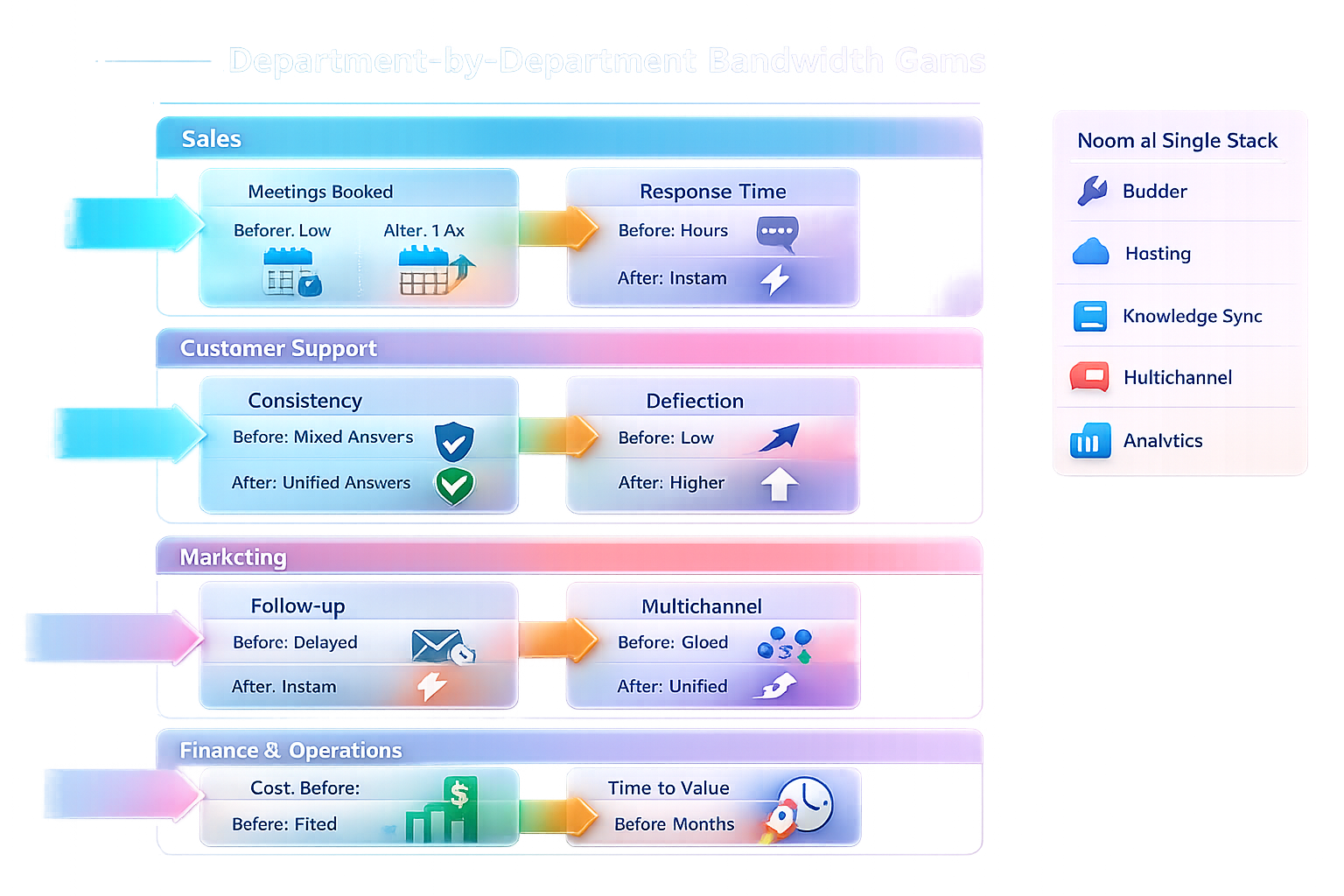
Noem.ai focuses 100 percent on chatbots that help you go live fast and learn fast. It bundles builder, hosting, knowledge sync, multichannel publishing, and analytics into a single stack so teams can launch in minutes instead of weeks. This makes it easy for business owners to meet visitors where they are and guide them to a next step with friendly prompts. Usage-based pricing means you can start small and grow with confidence. The result is a simple, trusted way to turn visitors into qualified leads without heavy setup or complex tools (ref: Noem.ai).
If you want to see how this looks on a real page, you can start with a hosted chatbot page and then add the same flow to your site-builder template. This keeps your content and tone consistent across pages and channels. Edits are fast, so you can make changes as you learn. You do not need a big project or a large team to get started. That keeps your energy on what matters most: helping visitors find answers and take the next step (ref: Noem.ai Help).
- Single stack, simple setup: One place to build, host, sync, and measure means less juggling. Your team can focus on the flow, not the plumbing. That speed helps you capture more intent while it is fresh. It is a clear path to create better-qualified sales opportunities (ref: Noem.ai).
- Auto-sync for trust: As your site changes, your chat stays current. Visitors get the right answer at the right time. That builds trust and keeps your brand strong on every page. Trust is the base for any follow-up, so this matters a lot (ref: Noem.ai).
- Insights that guide action: Clear metrics and readable chat history help you see what to improve next. When you can measure deflection and first-contact resolution, you can make smart edits that save time. This also makes your team follow-ups faster and more relevant. Little by little, your flow gets stronger (ref: Dropbox Tech).
- Support and sales, side by side: The same friendly flow can answer support FAQs and pre-sales questions. This lets visitors choose their path without friction. Over time, both paths help your pipeline grow. And because the flow lives on your site-builder pages, setup is fast and tidy (ref: Noem.ai).
Ready to turn your site traffic into real conversations today. Try a lightweight flow on a hosted page, then add it to your site-builder in minutes with Noem.ai. If you want a fast start, grab a plain-language script and ship it this afternoon with Noem.ai. Looking for better-qualified sales opportunities from your pricing and product pages. Launch your friendly flow now with Noem.ai. Want 24/7 coverage that reduces response time and keeps your brand voice strong. Put your assistant to work in minutes with Noem.ai.