A small, fast chatbot can change how visitors feel on your website. They get answers right away, at any time of day, without waiting for email replies. A tool like Noem.ai is simple to add and easy to tune, so teams ship in minutes and improve later with real chat data. This matters because people bounce when they cannot find what they need, and a quick reply can save the visit. With a short setup, you start giving help right now and build trust with every chat.
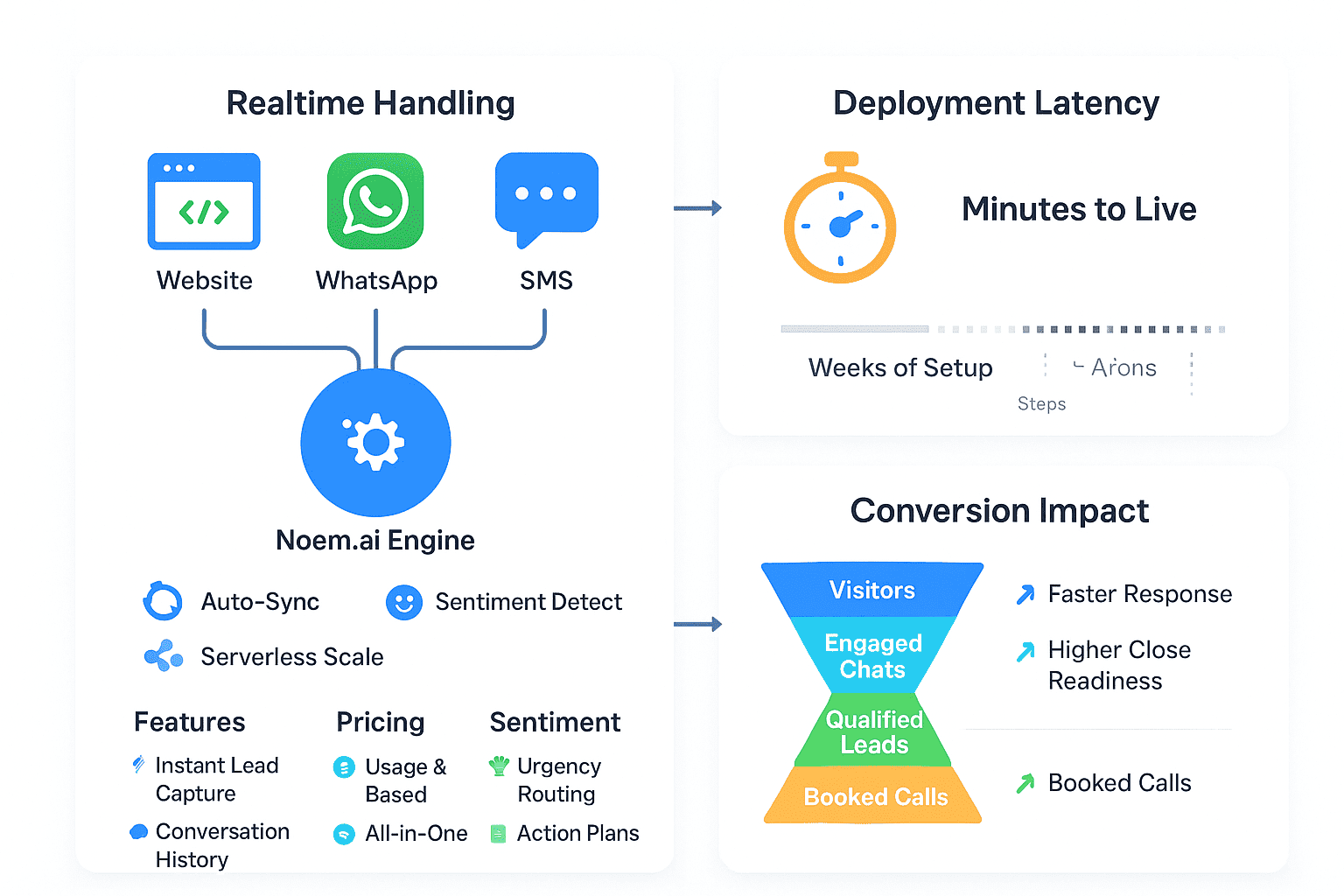
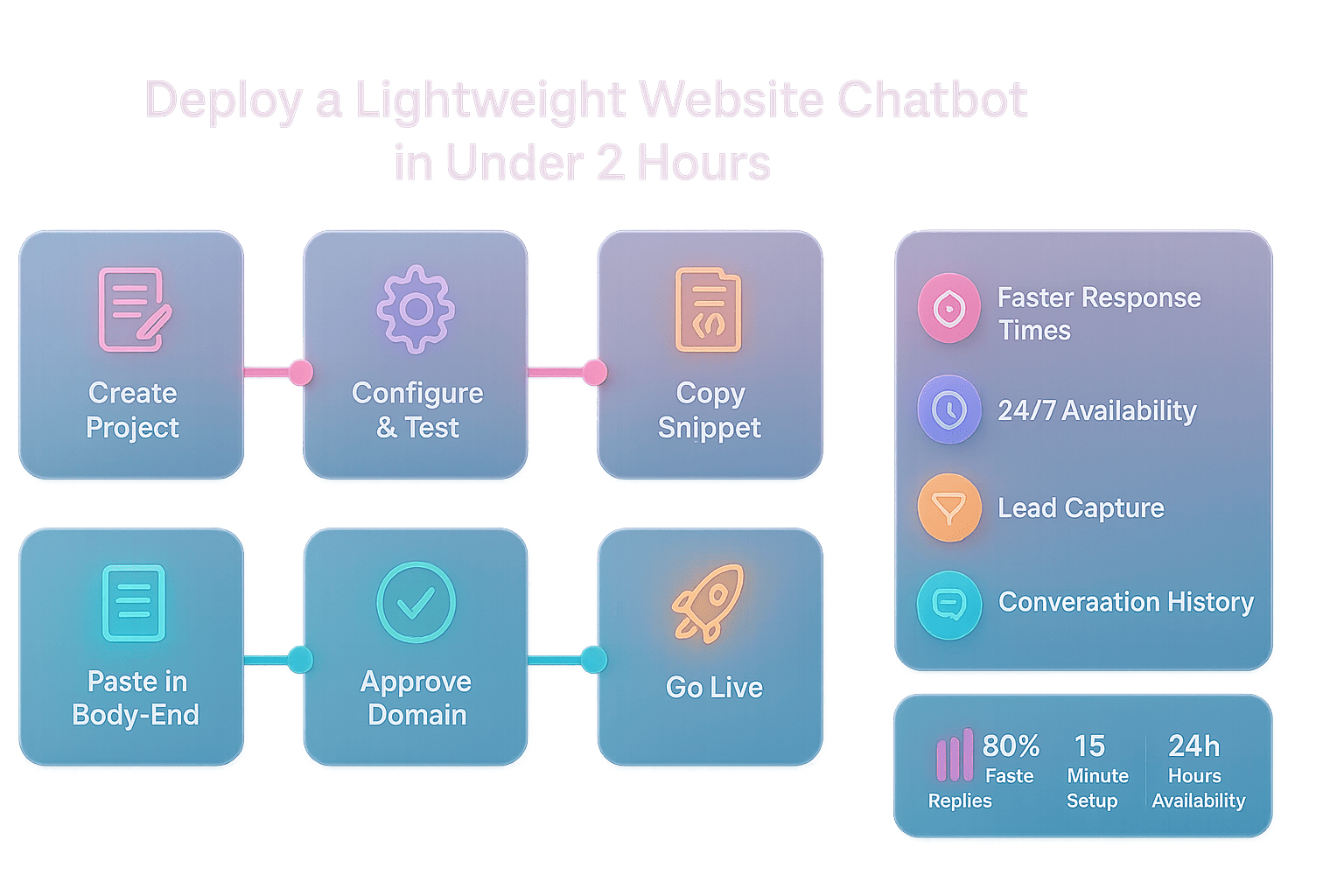
Many business owners think a chatbot takes weeks or needs a big budget. That is not true anymore. Today you can place a small code snippet on your site and go live in about 15 minutes, then test, tweak, and grow as you learn. Industry benchmarks show first-touch replies can be up to 80 percent faster with a chatbot, which means visitors get what they need before they give up and leave (ref: Noem.ai ). With 24/7 coverage, you also catch after-hours questions and turn them into leads you can follow up on later (ref: Noem.ai ).
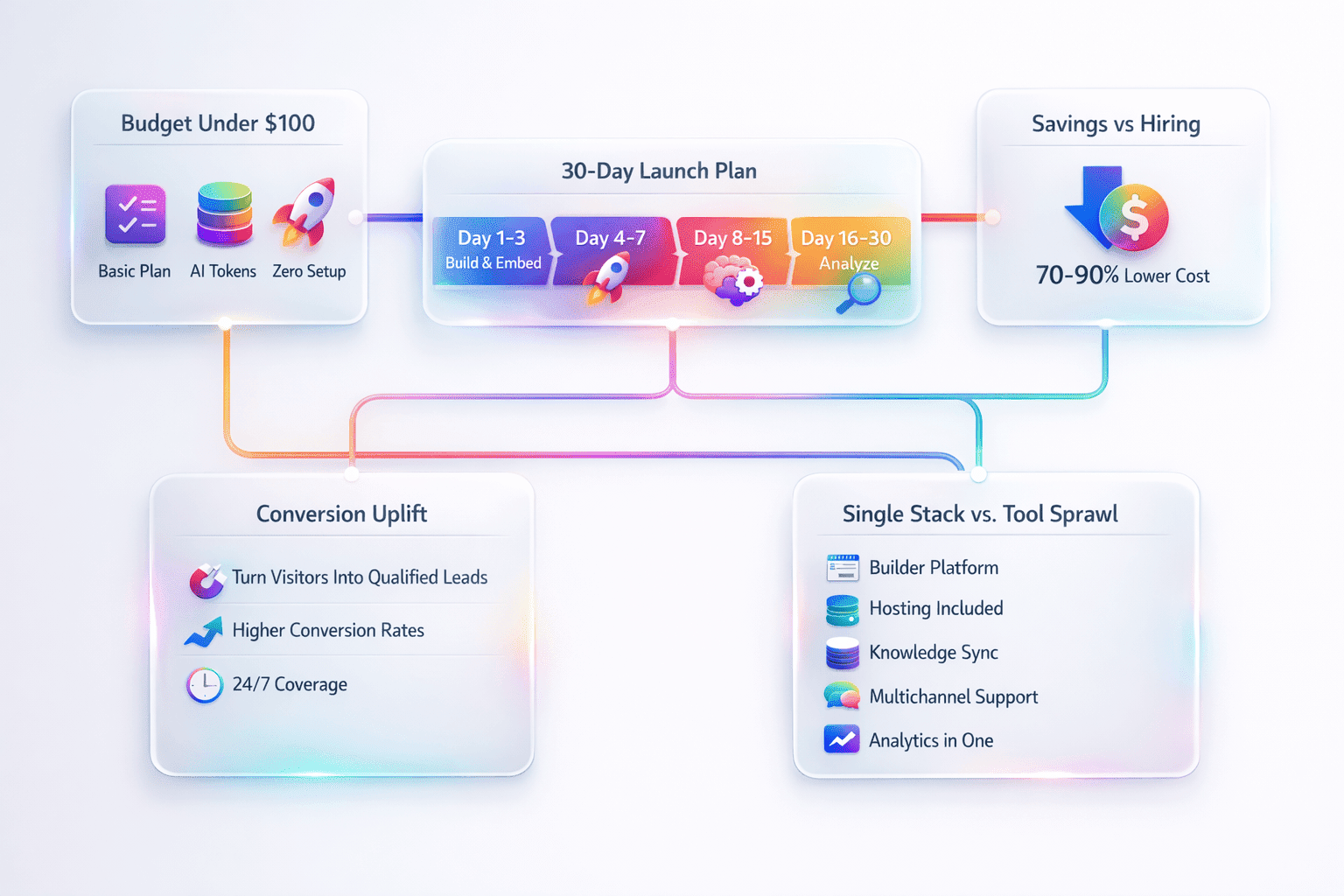
One more edge is how the tool fits into your stack. Noem.ai bundles builder, hosting, knowledge sync, multichannel publishing, and analytics into one place so you do not juggle many vendors. This simple stack helps you launch fast and scale in a clear, steady way. With usage-based pricing and auto-sync of your latest content, your bot stays fresh without extra work (ref: Noem.ai ). Your team gets the win of speed, and your visitors get the win of clear, friendly answers.
What You Get On Day One (And Why It Matters)
- Faster Response Times: Your visitors ask and get answers in seconds instead of minutes. Benchmarks show up to 80 percent faster first replies when a chatbot helps greet and guide people right away (ref: Noem.ai ). This quick help reduces bounce and keeps folks moving toward a page, a booking, or a checkout they need. When people feel heard fast, they are more likely to engage and return to your site later too (ref: Noem.ai ).
- 24/7 Customer Support Availability: Your site is open all day and night, so your help should be too. With Noem.ai, the widget runs after hours and on weekends without you needing to log in at odd times (ref: Noem.ai ). This captures late-night and early-morning visits that would be missed. You can then follow up on those chats the next day with context from the transcript (ref: Noem.ai ).
- Lead Capture From Website Conversations: Your bot can ask friendly, natural prompts for an email or phone number at the right time. When someone shows interest, the bot can invite them to share details so you can reach out later (ref: Noem.ai ). This is easier than long forms because the chat feels like a helpful talk. The result is more warm leads gathered right inside your site chat (ref: Noem.ai ).
- Complete Conversation History: Every chat is saved so your team can see the whole story from first hello to final follow-up. This history helps you learn what people ask most and how the bot performs (ref: Noem.ai ). You can adjust your welcome message, add answers to common questions, and track key metrics like total chats and average reply time (ref: Noem.ai ). With a clear record, it is simple to coach your team and improve how your site helps visitors.
- Lightweight, No-Code Install: The widget loads async and stays fast so your pages do not lag. You can add it to custom HTML, or builders like Wix and Squarespace, in just a few clicks (ref: Noem.ai ). The code goes near the end of the body and pops up as a small bubble in the corner without breaking your layout (ref: Noem.ai ). It looks great on phones and desktop, and you can style it to fit your brand (ref: Noem.ai ).
Step-By-Step: Be Live In About 15 Minutes (Well Under 2 Hours)
This quick guide is meant for your very first website. You will create a project, test your bot, and paste a simple code snippet. If you can copy and paste, you can do this. The process is built so you do not need a developer, and you can verify as you go. Use this once, then repeat for more sites or pages when you are ready (ref: Noem.ai ).
- Create Your Project
Start by signing up and going to your dashboard. Click My Projects, then Create Chatbot, and give it a name that sounds friendly to your customers (ref: Noem.ai ). Add a profile image, set a short welcome message, and pick a clear display name like SupportBot or Help Center. Write instructions that keep a helpful tone and simple words. Your bot uses these to respond in a way that fits your brand.
- Configure And Test Quickly
Inside the dashboard, you can set style, behavior, and the sources it should use. You can press Test to try sample chats without touching your site yet (ref: Noem.ai ). Keep chat history on so you can review what it says and tune it. Update your welcome message if people need a nudge to ask the right question. This is also a good time to add a polite lead prompt that appears after the bot gives value.
- Grab Your Code Snippet
Go to Deploy, then Website Integration. Copy the small JavaScript snippet that the dashboard shows for your bot (ref: Noem.ai ). This snippet is unique to your project and helps the widget find your settings safely. You do not need to change the code since it is built to be pasted as-is. Keep it handy for the next step.
- Paste It Into Your Site
Open your site code and place the snippet right before the closing body tag. This keeps the page fast and lets the bubble load at the end (ref: Noem.ai ). If you use Wix, go to Settings, then Custom Code, and choose Body – End for the best performance (ref: Noem.ai ). It also works with React, Vue, and other setups without extra server code (ref: Noem.ai ). Save your site and get ready to approve your domain.
- Approve Your Domain And Launch
Back in Deploy, open Approved Domains and add your site URL. Make sure there are no spaces or trailing slashes so it matches how your site loads (ref: Noem.ai ). Save, then refresh your web page to see the chat bubble appear in the corner. If it does not show up right away, clear your cache or try a private window to test (ref: Noem.ai ). You are now live and ready to greet visitors.
Time Guide You Can Trust
- Create and Configure: About 5 minutes if you follow a simple script and keep your first version clean (ref: Noem.ai ). This beats long setup forms and keeps you focused on what your visitor needs to see first. You can always refine your instructions as real chats roll in. Let your data show you the best words to use.
- Embed Code: About 5 minutes since you just paste where the page ends (ref: Noem.ai ). This works well on custom HTML and most builders. Because the widget is async, it does not slow down your top content. That helps your SEO and visitor experience.
- Approve And Test: About 5 minutes to add your domain and press refresh (ref: Noem.ai ). Try a few common questions and a lead capture prompt. If you can, test on staging first so you can be sure the look and feel are just right (ref: Noem.ai ).
A 7-Day Launch Plan That Fits Your Schedule
You do not need a big project plan. You can roll out fast and learn from day one. This simple 7-day plan helps you keep focus and get real results without stress. Pick your start day and follow each step. By the end of the week, your site will be faster to help and better at gathering leads.
- Day 1: Build, Test, Approve Your Domain. Create your bot, write a warm welcome, and press Test to check replies. Turn on chat history so you can review what works and what does not (ref: Noem.ai ). Approve your domain in Deploy so the widget shows up when you are ready to go live (ref: Noem.ai ).
- Day 2: Embed On Your Homepage And FAQ. Paste the code into your site and test on both desktop and mobile (ref: Noem.ai ). If you capture email, consider passing user data you already know so the chat can address the person by name when they opt in (ref: Noem.ai ). Keep prompts short and clear so they feel friendly.
- Day 3: Review Chats And Improve Answers. Read your chat history to find the top questions. Add short, clear answers right inside your bot settings (ref: Noem.ai ). Adjust your welcome message to guide people to your best pages. Keep the tone helpful, simple, and honest.
- Day 4: Tune Lead Capture. Add a soft call to action after the bot provides help. Ask for an email with a reason, like sending a quick guide or a quote (ref: Noem.ai ). Make sure you store the lead details in a safe place, and plan a quick follow-up note the next day. Keep it personal, short, and useful.
- Day 5: Add Your Knowledge Sources. Sync your FAQs, product pages, or help docs to keep answers fresh. With auto-sync, your bot reflects the latest content without more manual steps (ref: Noem.ai ). Check a few sample questions to confirm the new info shows up well. Keep refining as you see gaps.
- Day 6: Style And Brand Fit. Match the widget color and icon to your site so it feels like a natural part of your brand. Keep contrast high for readability and add alt text if you use custom icons (ref: Noem.ai ). Check on a phone to be sure buttons are easy to tap. Small design fixes can boost chat starts.
- Day 7: Expand To High-Traffic Pages. Add the widget to product pages, pricing, and your contact page. Review your report for total chats, average response time, and captured leads to see early wins (ref: Noem.ai ). Keep what works and keep trimming what does not. Small, steady gains add up fast.
Why Choose Noem.ai For Your First Chatbot
Picking the right platform is half the battle. You want to go live fast, keep your site snappy, and manage everything in one place. This is where Noem.ai stands out for business owners who want a tool they can set and run. It is focused 100 percent on chatbots, which means the stack is built for speed, simplicity, and trust. You do not need to juggle one vendor for the builder, another for hosting, and a third for analytics.
- One Stack, Zero Juggling: With builder, hosting, knowledge sync, multichannel publishing, and analytics together, you get a single system to manage (ref: Noem.ai ). This gives you a short path to launch and a clear path to grow. You can test a change in minutes and see the impact in your dashboard. That saves time and keeps your team focused on your customers.
- Always Up To Date: Continuous auto-sync means your chatbot reflects your latest FAQs, policies, and product details without extra manual steps (ref: Noem.ai ). When your content changes, your bot learns the new version. This cuts down on mistakes and stale answers. It also keeps your help content aligned across pages.
- Predictable Scaling: Usage-based pricing lets you pay for what you use and grow with confidence. You can start small on one site and add more as results come in (ref: Noem.ai ). If your traffic spikes, your system stays steady and you know what to expect. That gives peace of mind when you run campaigns or seasonal sales.
- Proven Install Paths: You can add the widget to anything from a custom HTML site to Wix or Squarespace. The docs show each path with clear steps and best practices like placing the code near the end of the body (ref: Noem.ai ). If you want a quick walk-through, there is also a video guide you can follow in a few minutes (ref: YouTube ). This helps non-technical owners get to done fast.
- End-To-End Analytics: From total chats to average reply time to leads captured, you get a useful view that helps you improve results each week (ref: Noem.ai ). With complete conversation history, you can spot patterns and update your content to help more people on the first try (ref: Noem.ai ). This mix of speed and insight is what turns a simple widget into a real growth lever.
Simple, Effective Prompts You Can Copy Today
You can get a lot of value with just a few clear prompts. These samples keep a friendly tone, help users move forward, and open a door for lead capture when it makes sense. Add them to your instructions or welcome flow on day one. Then watch your chat history to see which ones drive the best actions on your site. Make small edits over time to match your voice.
- Greeting Prompt: “Hi there! I can help you find answers fast. What are you looking for today?” This light touch sets a warm tone and invites the first question. It also nudges users to share goals, which helps your bot guide them better. Keep it short and friendly so people want to click.
- Lead Prompt After Help: “Would you like a quick summary by email so you can save it for later?” This works after the bot provides value, like a product fit summary or a pricing overview. It feels helpful instead of pushy. You can also offer a sample guide or checklist to make it more useful (ref: Noem.ai ).
- Page Guidance: “Want me to take you to our pricing or a top FAQ?” This helps visitors move from chat to the right page in one click. It keeps momentum going and lowers the chance they get lost. Use your analytics to learn which pages to feature (ref: Noem.ai ).
- After-Hours Help: “I am here 24/7. If you need a call back, what is the best email?” This invites a lead gently when live staff are offline. It balances quick help now with a promise to follow up later. People like knowing a real person will reach out soon (ref: Noem.ai ).
Best Practices To Keep It Helpful And On-Brand
Little tweaks can make a big difference. Keep your words simple so anyone can get help fast. Use your conversation history to find where people are stuck and fix those spots first. Check both desktop and mobile, because many chats start on a phone. And follow a short weekly routine so your chatbot keeps getting better with time.
- Write Like You Talk: Short sentences, common words, and a friendly tone make help feel easy. Avoid jargon and long lists when a simple link will do. Keep your welcome message to one or two short lines. This removes friction and gets users to ask their first question.
- Keep It Fast: Place your code near the end of the body so your main content loads first (ref: Noem.ai ). Because the widget loads async, it will not slow your page. Speed is good for both visitors and search engines. Check your site speed after you add the widget to confirm it stays snappy.
- Use Clear CTAs: Ask one thing at a time, like “Want me to connect you to our pricing page?” This helps people say yes and move forward. If you need an email, explain why, like “I can send a quick summary.” A simple reason builds trust and lifts opt-ins.
- Review Weekly: Look at total chats, top questions, and response time in your dashboard (ref: Noem.ai ). Update your answers to cover the most common needs. Add links to your top pages where they help the most. Over time, you will see fewer repeats and more forward motion.
Answers To Common First-Time Questions
- Will it work on my builder? Yes. You can drop the code into custom HTML or builders like Wix and Squarespace in minutes (ref: Noem.ai ). The docs show step-by-step paths for each, and you paste near the end of the body for the best result (ref: Noem.ai ). It is built to be lightweight and secure for modern sites.
- How do I make sure it uses my latest info? Use knowledge sync so your bot pulls from the most current docs and pages (ref: Noem.ai ). With auto-sync on, you do not have to re-upload content every time you change a line. This keeps your answers fresh. It also lowers the chance of gaps in your help content.
- Is it really that fast to install? Yes. The first version can be live in about 15 minutes: create, configure, paste, approve, and test (ref: Noem.ai ). This is far less time than building a full help center before you even know what people ask the most. The key is to start small and learn from real chats. You can add more depth as you see what users want.
- What results should I look for first? Start with average reply time, total chats, and captured leads (ref: Noem.ai ). These show if you are helping people faster and turning interest into follow-ups. Watch top questions to guide your next content updates. Short loops make steady gains.
Bring It All Together On Your Site Today
You do not need a big team to make your website more helpful. A pocket-sized chatbot can greet, guide, and gather leads around the clock. With Noem.ai, you get a single stack that makes launch simple and improvements steady over time. You can be live this afternoon and learning from real chats by tonight. That is the kind of speed that turns visitors into customers (ref: Noem.ai ).
Ready to meet more visitors where they are? Add Noem.ai to your first website, start capturing leads in minutes, and give guests the fast, friendly help they deserve. If you want a hand, follow the quick-start docs, watch the short video, or reach out to the team for tips on your setup (ref: Noem.ai ) (ref: YouTube ). Your visitors are already asking questions. Will your site answer them in seconds starting today?