
- Overview
- What Agent Skills Are
- Purpose of Agent Skills
- When to Use Agent Skills
- How Agent Skills Work
- Where to Find Agent Skills
- Option 1: Create a Skill From Scratch
- Option 2: Use the Skill Library
- Option 3: Copy a Skill From Another Project
- What to Include in a Good Skill
- Example Skill: Lead Capture & Follow-up
- Example Skill: Zendesk Ticket Escalation
- Example Skill: Shopify Product Finder
- Best Practices
- What to Test
- Common Issues
- Recommended Workflow
- Final Thoughts
Overview #
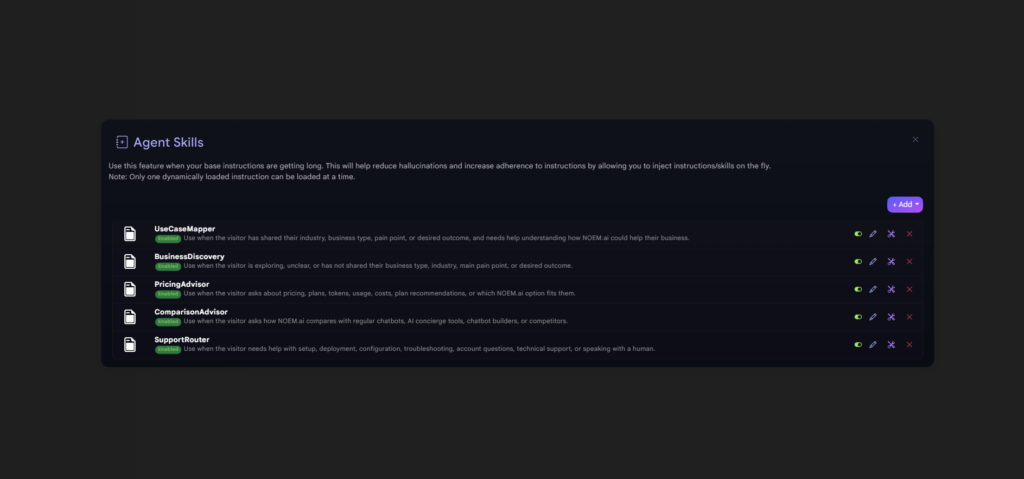
Agent Skills let you add focused, scenario-specific instructions to your chatbot without making your main instruction set too long or complicated.
Instead of putting every possible behavior into your base chatbot instructions, you can create smaller “mini instruction blocks” that load only when a specific situation happens. This helps your chatbot stay more focused, follow instructions more reliably, and avoid unnecessary confusion.
Agent Skills are useful when your chatbot needs different behavior for different scenarios, such as lead capture, product recommendations, support escalation, research workflows, or Shopify shopping flows.
Only one dynamically loaded skill can be active at a time.
What Agent Skills Are #
An Agent Skill is a saved instruction set for a specific task or conversation scenario.
Think of it as a focused behavior module.
Your main chatbot instructions define the bot’s general role, tone, scope, and rules. A skill adds extra instructions only when a specific trigger or scenario applies.
For example, your base chatbot might say:
“You are a helpful ecommerce assistant.”
Then a skill can say:
“When the user needs help choosing a product, ask 2 to 5 short questions, collect their preferences, and recommend matching products.”
This keeps the main instructions cleaner while still allowing the chatbot to handle specialized flows.
Purpose of Agent Skills #
Use Agent Skills when your base instructions are becoming too long or when the chatbot needs to behave differently depending on the user’s intent.
Agent Skills can help you:
- keep base instructions shorter and cleaner
- reduce hallucinations caused by overloaded instructions
- improve adherence to specific workflows
- add reusable behavior for common scenarios
- separate support, sales, research, ecommerce, and escalation logic
- avoid forcing the chatbot to remember every rule at all times
A good way to think about it is:
Base instructions = who the chatbot is
Skills = what the chatbot should do in specific situations
When to Use Agent Skills #
You should consider creating a skill when a behavior is important, repeatable, and only applies in certain situations.
Good examples include:
- lead capture flows
- support escalation
- Zendesk ticket creation
- Shopify product discovery
- gift finder flows
- research assistant behavior
- quote qualification
- booking or demo qualification
- onboarding guidance
- troubleshooting workflows
- product comparison
- collecting missing customer details
Do not create a skill for every small instruction. If a rule applies all the time, it usually belongs in your base instructions. If it applies only in a specific scenario, it is a good candidate for a skill.
How Agent Skills Work #
Agent Skills are loaded dynamically when the chatbot detects that a specific scenario or trigger applies.
For example, a skill can be triggered when a user say:
- “I need help choosing”
- “I want to compare these options”
- “Can someone contact me?”
- “I need support”
- “I want to buy a gift”
- “Create a ticket”
- “I’m looking for a product”
Once the skill is triggered, Noem.ai injects the related instructions into the conversation so the chatbot can follow that scenario more closely.
Important: only one dynamically loaded skill can be active at a time. This prevents multiple skill instructions from competing with each other in the same conversation.
Where to Find Agent Skills #
To open Agent Skills:
- Open your chatbot project in Noem.ai.
- Go to the chatbot configuration area.
- Open Agent Skills.
- Click + Add to create or add a skill.
When adding a skill, you can choose from three options:
- From Scratch
- From Skill Library
- From Project
Option 1: Create a Skill From Scratch #
Choose From Scratch when you want to build a custom skill for your exact workflow.
This is best when your business has specific rules, language, qualification steps, or routing requirements.
For example, you might create a custom skill called:
Book a Demo Qualification
The skill could tell the chatbot to:
- detect when a user wants a demo
- ask what type of business they have
- ask what problem they want to solve
- collect their email
- send them to the demo booking link
- avoid asking too many questions at once
Custom skills are best when you already know the exact behavior you want.
Option 2: Use the Skill Library #
The Skill Library gives you ready-made skill templates that you can use as a starting point.
This is the fastest way to add common chatbot workflows without writing everything from scratch.
Skill Library templates may include skills such as:
- Lead Capture & Follow-up
- Knowledge Research Assistant
- Zendesk Ticket Escalation
- Shopify product finder
- Shopify gift finder
- Product comparison flows
- Shopper profile builder
Some skills are marked with labels such as [Shopify]. These require the related integration to be enabled before they can work correctly.
For example, a [Shopify] Find the right product skill may depend on Shopify product search tools. If Shopify is not connected, the skill may not be able to retrieve products.
Option 3: Copy a Skill From Another Project #
Choose From Project when you already created a useful skill in another chatbot and want to reuse it.
This is helpful for agencies, teams, or businesses managing multiple chatbot projects.
For example, if you created a strong Lead Capture & Follow-up skill for one chatbot, you can copy it into another project and adjust the wording instead of rebuilding it from zero.
When copying from another project:
- Choose an accessible chatbot project.
- Select one of its saved skills.
- Copy it into the current chatbot.
- Review and customize the skill before using it.
This is useful when several chatbots need similar behavior but different branding, links, or qualification questions.
What to Include in a Good Skill #
A good skill should be specific and easy for the chatbot to follow.
Most skills should include:
1. Skill Purpose #
Explain what the skill is for.
Example:
“Use this skill when the user wants help choosing the right product.”
2. Trigger #
Define when the skill should activate.
Example:
“Trigger this skill when the user says they need help deciding, comparing products, or finding the right option.”
3. Behavior #
Explain what the chatbot should do once the skill is active.
Example:
“Ask up to three short questions, then recommend the best option based on the user’s answers.”
4. Tool Usage #
If the skill depends on a tool or integration, explain when to use it.
Example:
“Use Shopify product search only after collecting the customer’s preferred category and budget.”
5. Guardrails #
Add rules that prevent bad behavior.
Example:
“Do not invent product availability. If no matching product is found, say so clearly and ask whether the user wants another option.”
6. Exit Condition #
Explain when the skill should stop.
Example:
“After recommending products, ask whether the user wants help comparing them or adding one to cart.”
Example Skill: Lead Capture & Follow-up #
Skill name:
Lead Capture & Follow-up
Purpose:
Use this skill when a visitor shows interest in being contacted, booking a demo, requesting pricing, or learning more about the business.
Trigger examples:
- “Can someone contact me?”
- “I want a demo”
- “How much does this cost?”
- “I’m interested”
- “Can I talk to sales?”
Skill behavior:
The chatbot should ask one question at a time and collect only the minimum information needed for follow-up.
Recommended flow:
- Ask what the user needs help with.
- Ask for their name.
- Ask for their email or preferred contact method.
- Confirm the request.
- Send the correct next step or contact link.
Guardrail:
Do not ask for sensitive personal information. Keep the flow short and friendly.
Example Skill: Zendesk Ticket Escalation #
Skill name:
Zendesk Ticket Escalation
Purpose:
Use this skill when the user needs human support or reports an issue that cannot be resolved in chat.
Trigger examples:
- “I need support”
- “This is not working”
- “I want to open a ticket”
- “Can someone help me?”
- “I have an account issue”
Skill behavior:
The chatbot should collect the issue summary and any safe, relevant details needed to create or route a support ticket.
Recommended flow:
- Acknowledge the issue.
- Ask for a short description of the problem.
- Ask for a safe contact method if needed.
- Create or route the ticket if the Zendesk integration is enabled.
- Confirm the next step.
Guardrail:
Do not ask for passwords, credit card numbers, private account credentials, or sensitive information.
Example Skill: Shopify Product Finder #
Skill name:
[Shopify] Find the Right Product
Purpose:
Use this skill when a shopper wants help finding a product but is unsure what to choose.
Trigger examples:
- “Help me pick”
- “Find me something”
- “I don’t know where to start”
- “I need something for…”
- “Can you recommend a product?”
Skill behavior:
The chatbot should run a short shopping interview before searching.
Recommended flow:
- Ask what the product is for.
- Ask about preferences such as size, style, color, or use case.
- Ask about budget if needed.
- Search Shopify products.
- Recommend 2 to 4 options.
- Offer to help compare or continue shopping.
Guardrail:
Do not invent product details. Use Shopify data when available.
Best Practices #
Keep each skill focused. A skill should handle one scenario well, not five unrelated scenarios.
Use clear triggers. If the trigger is too vague, the skill may activate at the wrong time.
Avoid duplicating your base instructions. Skills should add scenario-specific behavior, not repeat everything your chatbot already knows.
Do not overload one skill. If a skill becomes too long, split it into smaller skills.
Test each skill after creating it. Ask questions that should trigger the skill and confirm the chatbot behaves correctly.
Use the Skill Library as a starting point. Templates can save time, but you should still customize them for your business.
Be careful with integration-based skills. If a skill depends on Shopify, Zendesk, or another tool, confirm the integration is connected before using it.
What to Test #
After adding a skill, test both positive and negative scenarios.
Test that the skill activates #
Ask a question that should trigger the skill.
Example:
“I need help choosing the right product.”
Expected result:
The chatbot should follow the product finder flow.
Test that the skill does not activate incorrectly #
Ask a general question that should not trigger the skill.
Example:
“What are your business hours?”
Expected result:
The chatbot should answer normally without starting the product finder flow.
Test tool usage #
If the skill uses Shopify, Zendesk, or another integration, test whether the chatbot uses the tool at the right time.
Test the exit #
Confirm the chatbot can complete the skill flow and return to normal conversation.
Common Issues #
The skill does not activate #
Check that the trigger language is clear enough. Add examples of phrases users may say when the skill should run.
The skill activates too often #
The trigger may be too broad. Make the activation condition more specific.
For example, instead of:
“Use this skill when the user needs help.”
Use:
“Use this skill when the user wants help choosing a product or asks for a product recommendation.”
The chatbot ignores the skill instructions #
Make the skill shorter and more direct. Long or conflicting instructions can reduce reliability.
A Shopify skill does not return products #
Confirm that Shopify is connected and that the skill is allowed to use Shopify product search.
A Zendesk skill does not create a ticket #
Confirm that Zendesk is connected and that the skill includes clear escalation behavior.
Two skills seem relevant at the same time #
Only one dynamically loaded skill can be active at a time. Make triggers specific so the chatbot can choose the right skill.
Recommended Workflow #
Use this workflow when setting up Agent Skills:
- Keep your base chatbot instructions focused on general behavior.
- Identify the scenarios that need special handling.
- Create or add a skill for each major scenario.
- Define clear triggers for each skill.
- Add only the instructions needed for that scenario.
- Test the skill with realistic user questions.
- Adjust the trigger or behavior if needed.
This keeps the chatbot easier to maintain as it grows.
Final Thoughts #
Agent Skills help you scale your chatbot instructions without making the main prompt too heavy.
Use base instructions for the chatbot’s general role, tone, and rules. Use skills for specific workflows that should only activate in certain situations.
When used well, skills make your chatbot more reliable, easier to manage, and better at following the right process at the right time.


